NetDiag+ icon
NetDiag+ icon

NetDiag+

NetDiag+ is a network diagnostics toolkit for iPhone and iPad with 27 tools, built for the moment something breaks and you need to know where.

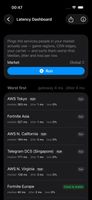
Latency Dashboard: the game regions, CDN edges and carriers people in your market actually use, sorted worst-first with median, jitter and loss per row. Your own router is checked before any of them.
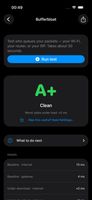
Bufferbloat test: the line is loaded on purpose while your router and the internet are pinged at the same time, then graded A to F. The gateway differential names who is queueing your packets — your Wi-Fi, your router, or your ISP.
+8
Path MTU discovery over ICMP with the Don't-Fragment bit: the largest packet the path carries end-to-end, the hop where it stops fitting, and the link type that explains why.

Cost / License

  • Freemium (Pay once)
  • Proprietary

Application type

Platforms

  • iPhone
  • iPad
1like
0articles
Save

Features

Properties

  1.  Lightweight

Features

  1.  No registration required
  2.  Website Monitoring
  3.  Dark Mode
  4.  Dns
  5.  Trace Route

NetDiag+ News & Activities

Highlights All activities

Recent activities

NetDiag+ information

  • Developed by

    SI flagDmytro Tishchenko
  • Licensing

    Proprietary and Freemium product.
  • Pricing

    One time purchase (perpetual license) ranging between $3 and $5 + free version with limited functionality.
  • Alternatives

    13 alternatives listed
  • Badge

    Get an embeddable badge for NetDiag+
  • Supported Languages

    • English
    • Arabic
    • French
    • German
    • Italian
    • Japanese
    • Korean
    • Polish
    • Portuguese
    • Russian
    • Spanish
    • Turkish
    • Ukrainian

AlternativeTo Category

Network & Admin
NetDiag+ was added to AlternativeTo by Dmytro-Tishchenko on and this page was last updated .

No comments or reviews, maybe you want to be first?

Official Links

What is NetDiag+?

NetDiag+ is a network diagnostics toolkit for iPhone and iPad with 27 tools, built for the moment something breaks and you need to know where.

Instead of a single speed number, it separates the hops. The Latency Dashboard pings the game regions, CDN edges and carriers that people in your country actually use, checks your own router first, and sorts the results worst-first with median, jitter and packet loss per row. The bufferbloat test loads the line on purpose while pinging your router and the internet at the same time, grades the result from A to F, and names who is queueing your packets: your Wi-Fi, your router, or your ISP.

The rest is the standard kit, done properly: ping, traceroute, MTR with per-hop loss, Path MTU discovery over ICMP with the Don't-Fragment bit, DNS and reverse lookups, encrypted DNS over HTTPS and TLS, whois, port scanner, LAN scanner, Bonjour browser, Wi-Fi analysis, TLS certificate inspector, HTTP/3 and QUIC reachability, IPv6 and NAT64 detection, STUN and NAT type, speed test, Wake-on-LAN, subnet calculator, IP geolocation and a continuous host monitor.

Everything runs locally on raw BSD sockets — no jailbreak, no root, no companion desktop app, no account. Results never leave the device, and every tool exports its output as plain text, which is what turns a diagnosis into evidence when you open a ticket with your provider.

13 languages with full right-to-left support. Free to use; one optional one-time purchase unlocks depth — text export, longer bufferbloat history, latency tables for markets other than your own — rather than unlocking tools.