NekoYaku icon
NekoYaku icon

NekoYaku

NekoYaku translates manga in place. Instead of rebuilding the page — erasing the Japanese, repainting the background and printing new text — it reads the page you already have open and lays the translation over it.
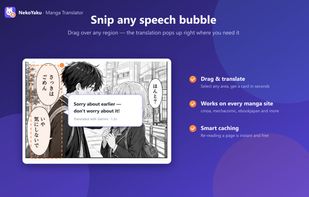
Drag a box over any bubble, caption or sign and the translation appears beside it. Snip works on any website, not just supported manga readers.

Cost / License

  • Freemium (Usage-based)
  • Proprietary

Application type

Platforms

  • Google Chrome
0likes
0articles
Save

Features

Properties

  1.  AI-Powered

Features

  1.  OCR
  2.  Ad-free

NekoYaku News & Activities

Highlights All activities

Recent activities

NekoYaku information

  • Developed by

    KR flagNEKOYAKU
  • Licensing

    Proprietary and Freemium product.
  • Pricing

    Usage-based pricing (pay per credit or per use) + free version with limited functionality.
  • Alternatives

    14 alternatives listed
  • Badge

    Get an embeddable badge for NekoYaku
  • Supported Languages

    • English
    • Korean
    • Japanese
    • Spanish
    • Portuguese
    • French
    • German
    • Chinese
NekoYaku was added to AlternativeTo by eunsang lee on and this page was last updated .

No comments or reviews, maybe you want to be first?

Official Links

What is NekoYaku?

NekoYaku translates manga in place. Instead of rebuilding the page — erasing the Japanese, repainting the background and printing new text — it reads the page you already have open and lays the translation over it. The artwork underneath never changes, and closing a card puts you back on the original.

Three reading modes: Pins places a small marker on each bubble so the art stays clean, Full page translates everything at once, and Snip translates any region you drag over.

15 output languages: English, Spanish, Brazilian Portuguese, French, German, Indonesian, Russian, Thai, Vietnamese, Arabic, Italian, Polish, Chinese, Korean and Turkish. Japanese is the default source, with auto-detect for other pages.

Two ways to run it. Hosted uses NekoYaku credits after a Google sign-in, and eligible new accounts start with 30 credits and 3 Bonus Snips at no cost. Bring-your-own-key sends requests straight from your browser to OpenRouter, Google Gemini or OpenAI and uses zero NekoYaku credits.

The extension's own interface is available in 8 languages, and translations are cached on your device for 7 days so re-reading a page costs nothing.

NekoYaku Videos
