Native Screen icon
Native Screen icon

Native Screen

 Like

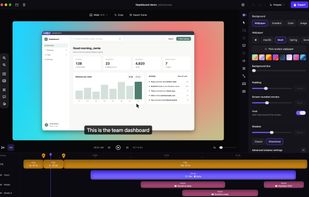
Native Screen turns a plain screen recording into a polished demo. Zooms follow your clicks and typing, the cursor glides instead of shaking, and you get captions, backgrounds and motion blur in the same app.
Native Screen screenshot 1

Cost / License

  • Free
  • Open Source (MIT)

Application type

Since

  • New

Updated

  • Updated Nov 2026

Platforms

  • Windows
  • Mac
0likes
0articles
Save

Features

Properties

Features

Highlights All activities

Native Screen News & Activities

Recent activities

Native Screen information

AlternativeTo Category

Video & Movies

GitHub repository

  •  0 Stars
  •  0 Forks
  •  0 Open Issues
  •   Updated  
View on GitHub
Native Screen was added to AlternativeTo by Trung Duc Mai on and this page was last updated .

No comments or reviews, maybe you want to be first?

Official Links

What is Native Screen?

Native Screen turns a plain screen recording into a polished demo. Zooms follow your clicks and typing, the cursor glides instead of shaking, and you get captions, backgrounds and motion blur in the same app.

When you want control, there is a real multi-track timeline with separate tracks for zooms, blur and spotlight masks, captions and keyboard shortcuts. You can edit the video by editing its transcript, remove filler words in one pass, and switch between wide, square and vertical at any time.

Recording, captions, sensitive data detection and export all run on your computer. There is no account, no upload, no telemetry and no watermark. The app is native on both systems (SwiftUI, AppKit and Metal on macOS, WinUI 3 and Direct3D 11 on Windows), with hardware encoding and no FFmpeg. AI agents such as Claude, Codex and Cursor can also drive the editor through MCP.