

MyExpander icon
MyExpander icon

MyExpander

 Like

Free Mac text expander: type a short code in any app and it becomes your text or your picture.
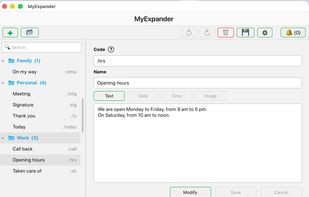
A shortcut and the text it writes: type ;hrs in any app and it becomes your opening hours.

Cost / License

  • Free
  • Proprietary

Application type

Since

  • New

Platforms

  • Mac  macOS 13 or later, Intel and Apple Silicon. Downloaded from the website, not notarised: the first time, open it with System Settings Privacy & Security Open Anyway. It then asks for the Accessibility permission, needed to replace your codes.
0likes
0articles
Save

Features

Properties

Features

Highlights All activities

MyExpander News & Activities

Recent activities

MyExpander information

AlternativeTo Category

Office & Productivity
MyExpander was added to AlternativeTo by desruisseaux on and this page was last updated .

No comments or reviews, maybe you want to be first?

What is MyExpander?

MyExpander replaces a short code you type in any app with your own text or picture.

  • Codes you choose, replaced as you type, in any app
  • Text or picture shortcuts
  • Today's date or time, in the format you choose
  • One shortcut inside another
  • Groups and a search box to sort your shortcuts
  • Optional sync with your other Macs through your own iCloud Drive
  • Automatic backups, plus a one-time copy to a USB key
  • 7 languages: English, French, Spanish, German, Italian, Portuguese, Japanese

Your shortcuts stay on your Mac. No account and no ads. It needs the Accessibility permission to replace your codes; what you type is never kept or sent.

macOS 13 or later, Intel and Apple Silicon.