mydroo icon
mydroo icon

mydroo

Modern, browser-based vector editor for posters, PDFs, and print - editable PDF import, real-time collaboration, print-ready export.
mydroo screenshot 1

Cost / License

  • Freemium (Subscription)
  • Proprietary

Platforms

  • Online
  • Software as a Service (SaaS)
0likes
0comments
0articles

Features

Properties

  1.  Lightweight

Features

  1.  WYSIWYG Support
  2.  No Tracking
  3.  Real time collaboration
  4.  Cloud Sync
  5.  Live Preview
  6.  Non Destructive Editing
  7.  Hardware Accelerated
  8.  Ad-free
  9.  Combine PDF
  10.  Support for Layers
  11.  PDF annotation
  12.  Split PDF files
  13.  Dark Mode
  14.  Color Picker
  15.  Team Collaboration
  16.  No installation required
  17.  AI-Powered
  18.  Web-Based

mydroo News & Activities

Highlights All activities

Recent activities

mydroo information

  • Developed by

    HU flagZsombor Fritz
  • Licensing

    Proprietary and Freemium product.
  • Pricing

    Subscription that costs up to $9 per month + free version with limited functionality.
  • Alternatives

    23 alternatives listed
  • Supported Languages

    • English
mydroo was added to AlternativeTo by Zsombor Fritz on and this page was last updated .
No comments or reviews, maybe you want to be first?

What is mydroo?

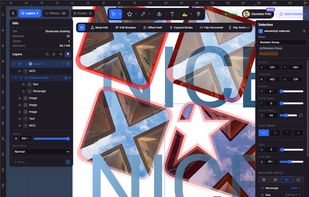
mydroo is a modern vector graphics editor that runs entirely in your browser. It sits between template-first tools like Canva and desktop apps like Adobe Illustrator: start fast from built-in templates, then drop into professional vector tools when you need them.

Open client PDFs as real editable paths and text - not flattened markup or annotation-only layers. Merge pages from multiple PDFs, rebrand layouts, and export print-ready PDFs with bleed, crop marks, and preserved vector text. Import DWG, DXF, SVG, PPTX, and PSD; export to PDF, SVG, PNG, and PPTX.

Design posters, flyers, brochures, invitations, and multi-page documents with paper sizes from A6 to B0. Use the pen tool, boolean operations, clipping masks, shape builder, multi-layer fills and strokes, variable fonts, and text on path.

Collaborate in real time with live cursors, team workspaces, folders, version history, and share links. Built-in stock photos, clipart, and icons keep assets in the workflow. On-device AI helps with background removal, image tracing, and quick edits - without replacing the core design tools.

Rendering uses Skia (CanvasKit/WASM) for desktop-grade performance in the browser. Free tier to get started; Plus unlocks more storage and premium assets. Built for print deliverables and marketing design, not UI mockups.

Website: https://mydroo.com

Official Links