My Home Network icon

My Home Network

Self-hosted network monitor for Raspberry Pi that scans your LAN and alerts you by Telegram or email when an unknown device joins.
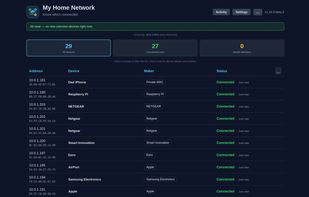
Dashboard listing every device found on the network, with IP and MAC address, detected vendor, and current connection status.

Cost / License

  • Pay once
  • Proprietary

Application types

Platforms

  • Linux  Ships as a prebuilt arm64 Docker image for Raspberry Pi. Other Linux architectures are not supported.
  • Self-Hosted
  • Raspberry Pi  Requires a Raspberry Pi 4 (2 GB RAM or more recommended) running 64-bit Raspberry Pi OS or Debian. Installed over SSH from a prebuilt arm64 Docker image; setup takes about 15 minutes.
1like
0comments
0articles

Features

Properties

  1.  Privacy focused

Features

  1.  Works Offline
  2.  Ad-free
  3.  No Tracking
  4.  Network Scanner

My Home Network News & Activities

Highlights All activities

Recent activities

My Home Network information

  • Developed by

    IT flagJizmo Digital
  • Licensing

    Proprietary and Commercial product.
  • Pricing

    One time purchase (perpetual license) that costs $15.
  • Alternatives

    5 alternatives listed
  • Supported Languages

    • English

AlternativeTo Category

Network & Admin
My Home Network was added to AlternativeTo by myhomenetapp on and this page was last updated .
No comments or reviews, maybe you want to be first?

What is My Home Network?

My Home Network turns a Raspberry Pi into a local monitor for your home network.

It periodically scans the LAN with nmap, looks up device vendors, and lets you rename devices and mark them as trusted or unknown. When a device you have not seen before joins the network, it notifies you via Telegram or email. Data is stored locally in SQLite on the Pi, and core monitoring works without any cloud account.

It is distributed as a paid digital kit rather than a source download: a prebuilt Docker image for arm64, an offline installer script, and a browser-based setup wizard. You supply the Raspberry Pi (a Pi 4 with 2 GB or more is recommended) and run a one-time SSH setup of about 15 minutes.

What it does not do: it does not block devices — it alerts you, and your router still controls who can join. It is not a pre-flashed SD card, and it does not ship with HTTPS or remote access; the dashboard is reached over the LAN at .

The project is currently in Early Access. One-time purchase, no subscription.

My Home Network Videos

