


MS-365-Electron
2 likes
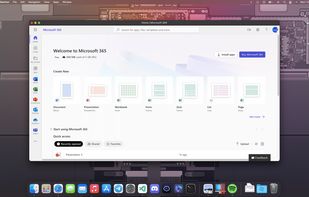
MS-365-Electron streamlines your workflow by offering a dedicated desktop interface for the free, web-based version of Microsoft 365. Think of it as a convenient launchpad for web applications like Word, Excel, and PowerPoint, eliminating the need to navigate through browser...

Cost / License
- Free
- Open Source (MIT)
Platforms
- Windows
- Mac
- Linux
- Snapcraft


Features
MS-365-Electron News & Activities
Highlights All activities
Recent activities
App require internet access and does not work offline. I know it is just electron app, but think, that after login into my Microsoft account app stay offline, because all files are stored locally, like with some other electron apps.
No, it is just chromium-browser, dedicated for MS Office Online. What's the point?!
MS-365-Electron information
Developed by
 Agampreet Singh
 Licensing
Open Source (MIT) and Free product.Written in
Alternatives
12 alternatives listedBadge
Get an embeddable badge for MS-365-ElectronSupported Languages


Comments and Reviews
App require internet access and does not work offline. I know it is just electron app, but think, that after login into my Microsoft account app stay offline, because all files are stored locally, like with some other electron apps.
No, it is just chromium-browser, dedicated for MS Office Online. What's the point?!