mrowser icon
mrowser icon

mrowser

 1 like

mrowser is a sideload-only web browser for Android TV, built for D-pad remotes. Its purpose is watching video from sites the platform has no app for.
mrowser screenshot 1

Cost / License

  • Free
  • Open Source (MIT)

Application type

Since

  • New

Updated

  • Updated Oct 2026

Platforms

  • Android TV
  • Android
1like
0articles
Save

Features

Properties

Features

Highlights All activities

mrowser News & Activities

Recent activities

mrowser information

AlternativeTo Category

Web Browsers

GitHub repository

  •  64 Stars
  •  5 Forks
  •  4 Open Issues
  •   Updated  
View on GitHub
mrowser was added to AlternativeTo by m-salehi-v on and this page was last updated .

No comments or reviews, maybe you want to be first?

Featured in Lists

The Ultimate Android/Google TV Setup

If you are on Android TV here is some apps to upgrade to a better experience, from launcher to stores, tools from alternatives clients you will have everything you need Thumbnail from Beebom https://www.youtube.com/@beebomco
By Darlene Sonalder86 appsUpdated

Official Links

What is mrowser?

mrowser is a sideload-only web browser for Android TV, built for D-pad remotes. Its purpose is watching video from sites the platform has no app for.

Android TV WebViews play video with audio that slowly drifts out of sync with the picture, and there is no setting for it. mrowser watches the page's own network requests for the HLS stream and hands it to a native Media3/ExoPlayer activity instead, which keeps audio locked to picture for a whole film, and adds real quality selection, audio-track switching and playback speed. BACK returns you to the page where you left it.

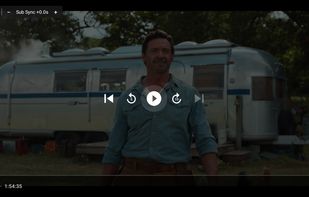
Side-loaded subtitles are rendered by the app rather than passed to the player, so their timing can be shifted half a second at a time during playback — instantly, with no rebuffering. Media3 exposes no API for this, which is why the app renders the cues itself.

A virtual mouse cursor driven by the D-pad, with acceleration and edge detection, makes hover menus, small controls and non-focusable links clickable from a remote. The address bar opens on a held BACK, for the many TV remotes with no MENU key. There is also a favourites grid, browsing history, HTML5 fullscreen and pop-up handling.

Scope: it hands off HLS (.m3u8), which covers most streaming sites. DASH-only sites, YouTube among them, and DRM-protected content keep playing in the WebView instead.

Privacy and footprint: one permission (INTERNET), no Google Play Services, no accounts, no analytics, no telemetry, no ads. Works on de-Googled and minimal Android TV builds. Plain Kotlin, a single module, about 4 MB. Android 6.0 and newer.

It ships with no preset sites or bookmarks, bundles and hosts no content, and does not circumvent DRM.

Distributed as an APK on GitHub Releases, or via Obtainium for automatic updates. Not on the Play Store.