


Thunderbird
Cross-platform email client supporting multiple identities, chat, and strong filtering. Extend functionality with add-ons like RSS/Atom feed readers and PGP support.

Cost / License
- Free
- Open Source (MPL-2.0)
Application types
Platforms
- Mac
- Windows
- Linux
- Android
- BSD
- AppImageHub
- Snapcraft
- Flathub
- PortableApps.com
- F-Droid
- Haiku
- Homebrew
- Chocolatey



Features
Properties
- Customizable
- Intuitive Interface
- Privacy focused
- Support for Themes
Features
- Extensible by Plugins/Extensions
- Multiple Account support
- IMAP Support
- Calendar Integration
- Email Organizer
- SMTP Support
- Add-ons
- Built-in RSS reader
- POP3 Support
- Graphical User Interface
- Dark Mode
 Google Calendar integration
- Works Offline
- OpenPGP
- Ad-free
 Gmail integration
- Tabbed interface
- Integrated Web Browser
- No Tracking
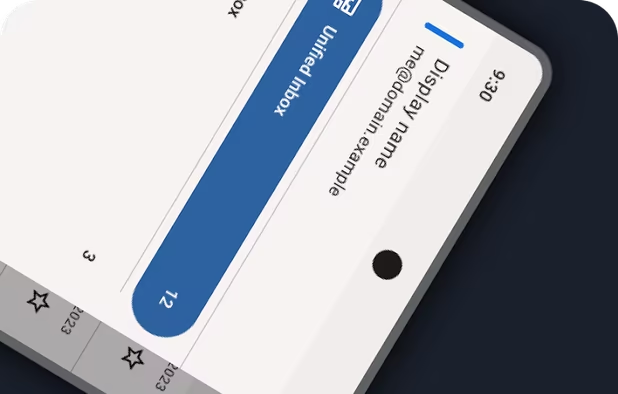
- Unified inbox
- Portable
- Built-in Calendar
- Mail Filtering
- Calendar Sync
- Integrated Chat
- Categories
- Full-Text Search
- Calendar View
- GPG Encryption
- PGP Encryption
- Import/Export OPML Feeds
- Integrated Password Manager
- Spam Filter
- Sync with Google Calendar
- Spell Checking
- No registration required
- Protected by Password
- Personal Information Manager (PIM)
- S/MIME Support
- Import from Google Reader
- Free API
- HTML Compose
- Legacy addons support
- Secure File Sharing
- Delivery reports
- Matrix Protocol
Thunderbird News & Activities
Recent News
- Fla published news article about Thunderbird
 Thunderbird 149.0: export address book cards & improved sync across devices
Thunderbird 149.0 introduces the ability to export selected address book cards, enabling easier con...
- Fla published news article about Thunderbird
 Thunderbird 148.0 boosts mail reliability, accessibility, and security
Thunderbird 148.0 improves accessibility in tree views and lets users file messages directly to Fav...
- Fla published news article about Thunderbird
 Thunderbird 147.0: new folder path option & localization preferences added
Thunderbird 147.0 introduces a new 'Show Full Path' option for the folder pane in compact view mode...


Recent activities
 marcoapp added Thunderbird as alternative to Marco


Featured in Lists

For many the Internet is Google: Search, mail, videos, web browser, cloud services, mobile OS, etc. – Google is the …

This is the apps for Windows 11 that I would recommend to anyone who just got a PC ! The same list for

Must have
What is Thunderbird?
Thunderbird is a free, open source, cross-platform e-mail, news and instant messaging client. The project strategy is modeled after  Mozilla Firefox.
It supports POP (storing mail locally on your hard drive so that it can be accessed without an internet connection), and IMAP. It features excellent mail filter capabilities and management.
Thunderbird has strong support for using multiple accounts and identities, including automated signature features.
Chat functionality is built in, so you can enjoy real-time conversation with your contacts, right from your favorite messaging application, with multiple supported networks. Thunderbird makes it easy to search through both past conversations and received emails.
Thunderbird can also function as an RSS/Atom feed reader, and has a large selection of add-ons that extend it with calendar support, PGP support, integration with online services and much more.
Thunderbird for Android is known as  K-9 Mail
Thunderbird Videos

Thunderbird information
Developed by
 Mozilla
 Licensing
Open Source (MPL-2.0) and Free product.Rating
Average rating of 4Alternatives
88 alternatives listedNews
34 news article related to ThunderbirdSupported Languages
- English
- Chinese


Comments and Reviews
I have tried several email clients including Outlook, Em Client, Claws Mail, Zimbra Desktop, Mailbird... and went back to Thunderbird every single time.
Thunderbird is simply still the most customizable email client out there that delivers a solid, stable performance for the unbeatable price of free.
Supports an unlimited number of mailboxes, calendards, has full-text email search, can show you an unified inbox, you can easily compose HTML messages, read RSS feeds, use extensions etc. It's really a Swiss army knife.
The only real alternative is Claws Mail if you rather prefer a fast, lightweight client.
If you only use 1-2 mailboxes (or don't mind paying) and use Windows, Em Client is a decent alternative, too, with a steady release period.
Good to know: Thunderbird is not an abandoned project, it's maintained by the community and bugfixes, minor feature updates are being released periodically.
Thunderbird has always been my favourite email client. But update after updates, Thunderbird gets worse and worse.
On each update, disabled extensions increase, and lot of them are no more updated, or, when they are updated, doesn't work as they should.
Some features asked for years by many users are still not made (like mail summary in list, as you can see in Apple Mail, and most of other email clients). Can't use maildir (beta / unsafe) instead of mbox.
I'm really fed up fighting with Thunderbird on each update with features like "dark mode" I don't really need or could wait for (as they disabled themes support which was useful for "dark mode" or "accessibility").
Looks like Mozilla is trying to kill Thunderbird !
New with this type program, so I don't have anything to compare with yet. On an average, it has a pleasant "tactile" sense in choosing.. fluid and fast. Left me mildly painfully aware of my email clutter.. it brings in email one-at-a-time, so it can take a while to set up. The one thing that raised a flag is that though the search/filter is very fast, it brought in something that seemed totally unrelated,.. so if you are filtering many emails, you will want to scroll thru to make sure that everything is what you wanted in case you want to delete. The styling, font appearance, and structure, somehow feel a little awkward, but again, I'm new with it. I notice that gmail seems particularly slow in transferring in emails during setup (compared to yahoo, etc).. about 23-25 emails every 10 minutes. So it's probably a good idea clear up gmails before starting in.
My everyday email program, manages emails from different providers, a CalDAV-synchronized calendar and even an RSS-feed.
Way, way, WAY too bloated, with an appalling, cluttered, messy, ugly interface. Everything with this app is a chore, and the user is given WAY too many options and settings on every screen - 99% of which are safe to totally ignore for 99% of users.
Didn't update in a while and now I'm shocked how bloated it became.
Thunderbird is extremely cludgy and messy. It is not friendly when using Office 365 for business due to requiring use of 3rd party paid service. It is heavy and just does not handle large email accounts well as it starts to crawl. It is fine for light weight use, but is far from a business class app.