Mist icon
Mist icon

Mist

 2 likes

A Mac utility that automatically downloads macOS Firmwares / Installers.
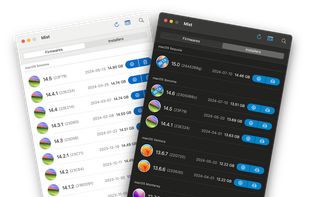
Mist screenshot 1

Cost / License

  • Free
  • Open Source (MIT)

Since

  • Since 2025

Updated

  • Updated Oct 2026

Releases

  • 1 release last year1 last year

Platforms

  • Mac
2likes
0articles
Save

Features

No features, maybe you want to suggest one?

Highlights All activities

Mist News & Activities

Recent activities

Mist information

GitHub repository

  •  5,345 Stars
  •  241 Forks
  •  77 Open Issues
  •   Updated  
View on GitHub

Our users have written 1 comment or review about Mist, and it has gotten 2 likes.

Mist was added to AlternativeTo by Saig on and this page was last updated .

Comments and Reviews

   
Saig
0

Best application for Download macOS versions !

Official Links

Install from the command line

  • brew install --cask mist

Be careful what you paste into a terminal. Check what a command installs before running it.

What is Mist?

A Mac utility that automatically downloads macOS Firmwares / Installers.

Features:

  • List all available macOS Firmwares / Installers available for download:
    • Display names, versions, builds, release dates and sizes
    • Optionally show beta versions of macOS
    • Filter macOS versions that are compatible with the Mac the app is being run from
    • Export lists as CSV, JSON, Property List or YAML
  • Download available macOS Firmwares / Installers:
    • For Apple Silicon Macs:
      • Download a Firmware Restore file (.ipsw)
      • Validates the SHA-1 checksum upon download
      • Copy firmware URLs to clipboard
    • For Intel based Macs (Universal for macOS Big Sur and later):
      • Generate an Application Bundle (.app)
      • Generate a Disk Image (.dmg)
      • Generate a Bootable Disk Image (.iso)
        • For use with virtualization software (ie. Parallels Desktop, UTM, VMware Fusion, VirtualBox)
      • Generate a macOS Installer Package (.pkg)
        • Supports packages on macOS Big Sur and newer with a massive 12GB+ payload!
      • Optionally codesign Disk Images and macOS Installer Packages
      • Cache downloads to speed up build operations
      • Select custom Software Update Catalogs, allowing you to list and download macOS Installers from the following:
        • Standard: The default catalog that ships with macOS
        • Customer Seed: The catalog available as part of the AppleSeed Program
        • Developer Seed: The catalog available as part of the Apple Developer Program
        • Public Seed: The catalog available as part of the Apple Beta Software Program
        • Note: Catalogs from the Seed Programs may contain beta / unreleased versions of macOS. Ensure you are a member of these programs before proceeding.
      • Validates the Chunklist checksums upon download
    • Automatic retries for failed downloads!