

IWantLinux icon
IWantLinux icon

IWantLinux

IWantLinux is a simple, beginner-friendly tool for Windows that helps you get started with Linux. Choose a distro from a curated list, and IWantLinux will download it and write it to a USB drive — ready to boot.
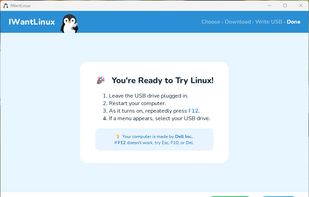
IWantLinux screenshot 1

Cost / License

Platforms

  • Windows
0likes
0comments
0articles

Features

Properties

  1.  Privacy focused
  2.  User friendly

Features

  1.  Ad-free
  2.  No Tracking
  3.  No registration required
  4.  Create bootable USB
  5.  Download ISO Images

IWantLinux News & Activities

Highlights All activities

Recent activities

IWantLinux information

  • Developed by

    US flagNathanael Cabral
  • Licensing

    Open Source (GPL-3.0) and Free product.
  • Written in

  • Alternatives

    51 alternatives listed
  • Supported Languages

    • English

AlternativeTo Category

CD/DVD Tools

GitHub repository

  •  3 Stars
  •  0 Forks
  •  1 Open Issues
  •   Updated  
View on GitHub

Popular alternatives

View all
IWantLinux was added to AlternativeTo by Paul on and this page was last updated .
No comments or reviews, maybe you want to be first?

What is IWantLinux?

IWantLinux is a simple, beginner-friendly tool for Windows that helps you get started with Linux. Choose a distro from a curated list, and IWantLinux will download it and write it to a USB drive — ready to boot.

Supported distros:

  • Linux Mint
  • Ubuntu
  • Zorin OS
  • Aurora

Four steps. That's it. No expertise required. IWantLinux handles the hard parts so you don't have to.

Here's how it works.

  1. Choose your Linux: Pick from four beginner-friendly versions, each with a plain-English description. No idea which one to try? Linux Mint is a great starting point for Windows users.
  2. We download it: IWantLinux fetches the latest official installer directly from that version's own servers — verified complete and genuine. No malware, no outdated files, no guesswork.
  3. Plug in a USB: Grab any USB drive that's 8 GB or larger. IWantLinux detects it automatically and writes the Linux installer to it — with a real-time progress bar so you know what's happening.
  4. Restart & explore: Leave the USB plugged in and restart. Linux boots up and runs entirely from the USB stick — your Windows files, programs, and settings are completely untouched.

Official Links
