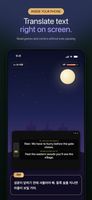
Miruyaku is a screen translator for iPhone and Android. Instead of copying text into a translator or switching apps, you start Live Translation and keep using the app you are in: a small floating window (Picture in Picture on iPhone, an overlay on Android) reads the text on screen, such as game dialogue, webtoons, manga and foreign articles, and keeps the translation flowing. It can also listen to the audio playing on the phone and show what is said as translated subtitles.
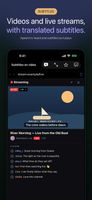
On iPhone, a built-in browser adds translated subtitles to videos and live streams as people speak. It has been checked with YouTube, Twitch and Kick, and can show the translation, the original, or both.
The same app covers everyday translation: point the camera at a sign or a menu and read the translation over the original lines, translate a screenshot or photo with the text kept in place, hold a face-to-face conversation in two languages, translate PDF and Word files in their layout, keep web pages and documents in a Library to read or listen to in translation, and translate typed or pasted text. Study Mode turns the sentences you translate into listening and speaking practice, with a word list and quizzes.
Every translation feature is free, with no cap on the number of translations, minutes or characters, and no account. The app is supported by ads; an optional Ad-Free purchase (monthly, yearly or lifetime) removes them and adds a Glossary for setting how names and terms are translated. With the standard engine, translation runs on the device, and what you translate is not sent to the developer.
Miruyaku translates into 60 languages, and its interface is available in 19 languages including English. It requires iOS 18 or later (video subtitles, audio translation, conversation, the Library, document and text translation need iOS 26 or later) or Android 10 or later. Subtitles in the built-in browser, back-tap shortcuts, the choice of translation engine and exporting translated PDFs are iPhone only.











 bbintroduction added Miruyaku as alternative to PlayTranslate, Screen Translator, iTranslate, Papago and 3 more




No comments or reviews, maybe you want to be first?