


Mini Diarium
3 likes
An encrypted local cross-platform journaling app.

Cost / License
- Free
- Open Source (MIT)
Application typeApplication types
 EU
EUPlatforms
- Mac
- Windows
- Linux


Features

Highlights All activities
Mini Diarium News & Activities
Recent activities
 modalk added Mini Diarium as alternative to Lifebook
 lien-muguercia added Mini Diarium as alternative to Roots: Daily Philosophy
- zhiny liked Mini Diarium
 Tintin Yuan added Mini Diarium as alternative to moodiary
 Yuji Ueki added Mini Diarium as alternative to deariary
- francisco-r-89 liked Mini Diarium
- niksavc liked Mini Diarium
 Paul added Mini Diarium as alternative to Day One, Journey, Evo, Perfice and 47 more
- Paul updated Mini Diarium


Developed by
 Francisco J. Revoredo
 Licensing
Open Source (MIT) and Free product.Written in
Alternatives
54 alternatives listedBadge
Get an embeddable badge for Mini DiariumSupported Languages

AlternativeTo Categories
Backup & Sync, Security & PrivacyGitHub repository
- 310 Stars
- 19 Forks
- 7 Open Issues
- Updated


Personal Journals
A list with 3 apps by ferenczy without a description.
Comments and Reviews
I have been using the application for a couple of days. Honestly, I think it is perfect and I would like more people to know about it.
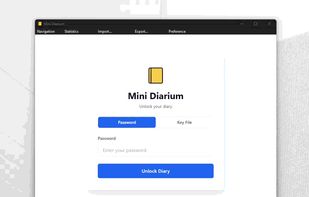
You can lock and unlock the journal. +1 You can use a password or an encrypted key +1 You can edit past entries, and if you wish future entries as well +1 As it is stored locally you can decide in which location of your hard drive the journal is stored, and it will also remain encrypted +2. And if you fear losing it, you can make a backup because you have your journal and not someone else. It doesn't need internet. Another function that I like is that you can add photos or titles to your entry. One day can have several entries, that is excellent. You can add tags to each entry and import markdown files, excellent if you will migrate from another application.
I hope the application continues improving, I think keeping a journal is important and I consider that with Mini Diarium I can achieve it without having distractions.