


Morgen
32 likes
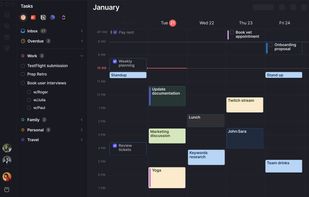
Brings together calendars, to-dos, productivity apps, and schedulers in one platform. Integrates with major services like Google Calendar, iCloud, Todoist, and video conferencing tools such as Zoom. Offers native scheduling similar to Calendly, enhancing time management efficiency.

Cost / License
- Subscription
- Proprietary
Application typeApplication types
Platforms
- Mac
- Windows
- Linux
- Android
- iPhone


Features


Highlights All activities
Morgen News & Activities
Recent News
No news, maybe you know any news worth sharing?
Share a News Tip
Recent activities
 Klaes Ethan added Morgen as alternative to Dank Calendar
 Ibrahim Alzant added Morgen as alternative to VerbinderApp Calendar
 Paul added Morgen as alternative to Clockenstein
 DiogenesMagnus added Morgen as alternative to Zefir Calendar


Progress & Management
A list with 568 apps by AmileyaRyver without a description.


Getting iCloud calendars on a Windows PC
If you live on an iPhone but work on a Windows PC, your iCloud calendar doesn't come along for the ride. Windows has no native iCloud integration, and the calendars someone else shared with you — a partner, a family, a team — are the part that most often goes missing entirely. These are the options I've found, from Apple's own bridge to third-party clients. Disclosure: one of them is mine, and I've said so on its entry.
Official Links


Install from the command line
winget install -e --id Morgen.Morgenbrew install --cask morgen
Developed by
 Morgen AG
 Licensing
Proprietary and Commercial product.Pricing
Subscription ranging between $7 and $30 per month.Rating
Average rating of 3Alternatives
132 alternatives listedBadge
Get an embeddable badge for MorgenSupported Languages
AlternativeTo Categories
Office & Productivity, Backup & SyncApple AppStore
- Updated
- 4.43 avg rating
GitHub repository
- 364 Stars
- 12 Forks
- 100 Open Issues
- Updated


Comments and Reviews
PROS:
CONS:
lol installed it and it keeps remind me about event that will happen in a month non stop and u cant turn it off :D
exiting MineTime application doesnt help)))
the only way to stop it is to reboot windows ahaha.
I used morgen for a long time and liked it. But then they started to increase the prices, now it costs more than a complete office suite - and you get only a calendar! I originally had a subscription for $45/year, which is the max I'm ok to pay for a calendar. Now it's 180$. It was a good product, they are on the way to enshitification now. I switched to emClient which has sensible prices and also a good calendar.
it's super amazing ! you can have it on your pc or your mobile ... visual planner with ai features .
I came across Morgen looking for a calendar client app running both on Windows and Linux, and I found so much more: slick scheduling support, great integrations with external task-management apps and even emails (every time I flag an email in outlook I found a task in Morgen!!! I really love that feature).
Well-designed, and feature-rich. In addition to its nice integration with XFCE
very good app with a lot of features and perfect to see some analytics of meeting times. perfect locationsearch and meetings with redundant locations are in listed view. Best app for ubuntu I found so far.