A free, open-source macOS toolbox. Twenty independent tools in one window, picked from the sidebar — no subscription, no tracking, no App Store.
Web
Download videos via yt-dlp with site-aware settings: YouTube and unknown hosts are re-encoded to H.264/AAC for QuickTime and iMessage compatibility, TikTok and Instagram are rewrapped without quality loss. Switch to audio-only (MP3, M4A, AAC, OPUS, FLAC, WAV, OGG) or download just a specific section of a video. Extract clean, readable text from any web page — ads, navigation and related-article boxes are stripped, JavaScript-rendered pages work too, and the result is editable before you copy or save it. Turn TikTok page URLs into direct download links with one click.
Text
Recognize text in photos, scans and screenshots using Apple's Vision framework — no external tools, fully offline, single file or batch, paste an image straight from the clipboard. Merge several text files in any order with a custom separator, output as TXT, Markdown, PDF or EPUB. Convert text files between character encodings with a live preview that catches a wrong source encoding immediately.
Images
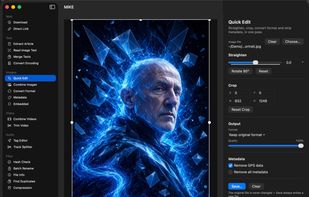
Straighten, crop, convert format and strip GPS or all metadata in one pass, with a live canvas and draggable crop handles. Stack or tile images into one tall or wide image, a PDF, or a fixed-layout EPUB. Convert between JPEG, PNG, WEBP, TIFF, BMP, GIF and HEIC in single-file or batch mode. Read and edit EXIF, GPS, TIFF and IPTC metadata; read and edit embedded text blocks including PNG chunks and XMP packets, with AI-generation parameters (AUTOMATIC1111, ComfyUI) highlighted.
Video
Trim a clip from MP4, MOV, MKV, M4V, AVI, WMV or FLV without re-encoding, using a draggable preview with start and end markers — drag or type timestamps, both stay in sync. Join MP4s without re-encoding, with upfront detection of codec, resolution and audio mismatches.
Audio
Edit title, artist, album, year, track number, genre, comment and cover art losslessly. Split a long recording at its silences, name the tracks with a pattern, tag them all at once, split without re-encoding.
Files
Verify any file with MD5, SHA-1, SHA-256 and SHA-512 simultaneously. Rename batches through up to six chainable steps with a live preview and collision detection. Inspect extended attributes and remove quarantine flags. Find byte-identical duplicates and move extras to the Trash. Pack and unpack ZIP and TAR.GZ archives.
External tools (yt-dlp, ffmpeg, exiftool) are never bundled — Setup shows what is installed and helps install what is missing. Everything else runs on Apple frameworks, no internet connection required.





 EU
EU





 NeonRost


No comments or reviews, maybe you want to be first?