
Midi2Macro icon
Midi2Macro icon

Midi2Macro

 Like

Turn any MIDI controller into a macro pad for Windows and Mac: shortcuts, OBS control, app launches and multi-step sequences, with full multi-profile support.
Midi2Macro functional overview

Cost / License

  • Freemium (Pay once)
  • Proprietary

Since

  • Since 2024

Platforms

  • Windows
  • Mac
0likes
0articles
Save

Features

Properties

Features

Highlights All activities

Midi2Macro News & Activities

Recent activities

Midi2Macro information

  • Developed by

    AU flagCatz Creatives
  • First released

    2024
  • Licensing

    Proprietary and Freemium product.
  • Pricing

    One time purchase (perpetual license) that costs $20 + free version with limited functionality.
  • Alternatives

    5 alternatives listed
  • Badge

    Get an embeddable badge for Midi2Macro
  • Supported Languages

    • English
Midi2Macro was added to AlternativeTo by Tobias on and this page was last updated .

No comments or reviews, maybe you want to be first?

What is Midi2Macro?

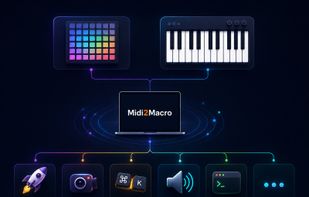
Midi2Macro turns a Launchpad, Launchkey, MIDI keyboard, fader bank or foot pedal into a control surface for your whole computer. Press a pad, pick what it does, and it fires every time: a keyboard shortcut, an OBS scene switch, an app launch (with a project file if you like), a folder, a sound, a shell command, or a sequence of those with waits in between.

Profiles hold a full layout for each connected device and per-app switching loads the right one when an app comes into focus, so the same pad can cut in DaVinci Resolve and switch scenes in OBS.

OBS is controlled directly over its WebSocket server, including scene switching, recording, streaming, mute and input volume on a physical fader. Pads, keys, faders, knobs and pedals (MIDI notes and CC) all work, no drivers needed.

Runs locally and works offline after activation. The free version includes every feature with up to 5 macros. Pro is a one-time purchase.

Midi2Macro Videos