Free Microsoft Visio Alternatives Filtered by 'No Coding Required'

The best free alternative to Microsoft Visio is draw.io, which is also Open Source. If that doesn't suit you, our users have ranked more than 100 alternatives to Microsoft Visio and many of them is free so hopefully you can find a suitable replacement. Other interesting free alternatives to Microsoft Visio are LibreOffice - Draw, QuikFlow, ProcessOn and Xmind AI.

Copy a direct link to this comment to your clipboard
Microsoft Visio alternatives page was last updated

Alternatives list

  1. draw.io icon
     1052 likes

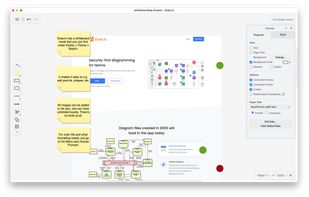
    Feature-rich diagram editor offering privacy-focused, ad-free experience with real-time collaboration, offline usage, dark mode, and cloud storage support. No registration required and compatible with various diagram formats, it excels in simplicity by not tracking user data.

    157 draw.io alternatives

    Cost / License

    Platforms

    • Mac
    • Windows
    • Linux
    • Online
    • Chrome OS
    • Notion
    • Self-Hosted
    • Nextcloud
    • Microsoft SharePoint
    • Flathub
    • Microsoft OneDrive
    • PortableApps.com
    • Google Drive
    • Google Docs
    • Microsoft Teams
    • Google Slides
    • Flatpak
    • Google Sheets
     
    |
    15
    draw.io vs Microsoft Visio Comments
    Top Positive Comment
    makerj
    10

    It is very convenient and contains many features.

    CRAZY HICK
    Positive
    0

    Lightweight, simple to learn/use and not a rip-off like Visio.

    Guest
    Positive
    0

    Simplified, easy to use interface. Free and Open Source. Clean UI design and look and feel.

    3 of 15 comments
    • draw.io is Free and Open SourceMicrosoft Visio is Paid and Proprietary
    • draw.io is Lightweight and Privacy focusedMicrosoft Visio is not according to our users
  2. Draw lets you produce anything from a quick sketch to a complex plan, and gives you the means to communicate with graphics and diagrams. With a maximum page size of 300cm by 300cm, Draw is a an excellent package for producing technical drawings, general posters, and much else.

    Cost / License

    Platforms

    • Mac
    • Windows
    • Linux
    • BSD
    • PortableApps.com
    • Flathub
     
    |
    7
    LibreOffice - Draw vs Microsoft Visio Comments
    Top Positive Comment
    Guest
    6

    It's free and open source, while Visio is proprietary and expensive.

    stefan-hoelzl
    Positive
    1

    It works well for me, is free and open source, and Visio obviously is not.

    Red-Case
    Positive
    1

    Not cloud based, which is great. Had problems with diagrams.net being unable to login with my Google account which made my files inaccessible.

    3 of 7 comments
    • LibreOffice - Draw is Free and Open SourceMicrosoft Visio is Paid and Proprietary
    • LibreOffice - Draw is Lightweight and Privacy focusedMicrosoft Visio is not according to our users
  3. QuikFlow icon
     4 likes

    Create flowcharts (and mind maps) without worrying about layout with QuikFlow. With our innovative interactive layout algorithms, you can work as if you were using a mind mapping application while creating flowcharts. Define your structure and the app handles the layout!

    Cost / License

    • Freemium
    • Proprietary

    Platforms

    • Mac
    • Windows
     
  4. ProcessOn icon
     22 likes

    ProcessOn is One tool for diverse diagramming needs.Product capabilities are mainly divided into Mind Map,Flowchart,Whiteboard,Mermaid,Formula Editor.Most importantly, ProcessOn supports AI-powered graphing, empowering tools through intelligent AI.

    Cost / License

    • Freemium
    • Proprietary

    Platforms

    • Mac
    • Windows
    • Linux
    • Online
    • Chrome OS
     
  5. Xmind AI icon
     6 likes

    Xmind AI is a powerful online mind mapping tool that uses AI to assist in generating ideas and offers seamless collaboration for your teams.

    Cost / License

    • Freemium
    • Proprietary

    Application type

    Platforms

    • Online
    • Software as a Service (SaaS)
     
  6. IngaBoard icon
     1 like

    IngaBoard is a minimalist, keyboard-driven application that turns fragments of "Cause and Effect" into structured Directed Acyclic Graphs (DAG) instantly. No manual boxes, no dragging lines. By stripping away superficial decoration, we reveal the inherent beauty of structural truth.

    Cost / License

    • Free
    • Proprietary

    Platforms

    • Mac
     
  7. Eraser IO icon
     3 likes

    Eraser is an all-in-one ideation tool for distributed teams. Eraser allows users to communicate ideas at the speed of thought using a markdown note editor, a lightweight canvas. Use Eraser for brainstorming, diagramming, wireframing, and interviewing!

    25 Eraser IO alternatives

    Cost / License

    • Freemium
    • Proprietary

    Application types

    Platforms

    • Online
     
  8. Nodalist AI icon
     1 like

    Not another chat box. Nodalist is a visual reasoning workspace where thinking holds its shape: node canvas, six-model AI debate (AI Storming), cited reusable research (AI Grounding), file-aware AI.

    Cost / License

    • Freemium
    • Proprietary

    Application types

    Platforms

    • Online
     
  9. DrillFlow icon
     Like

    DrillFlow is a local-first diagram editor for organizing complex information through hierarchical depth. Unlike flat canvases, every node can hold its own sub-diagram — so you drill down into a step, understand it, and come back up, with breadcrumbs and a subflow tree instead of...

    Cost / License

    • Free
    • Proprietary

    Application type

    Platforms

    • Online
    • Software as a Service (SaaS)
     
  10. Vexlio icon
     2 likes

    Vexlio turns flowcharts, process maps, and diagrams into clickable, interactive visuals that can be shared with a link (no sign-in required to view).

    Cost / License

    • Freemium
    • Proprietary

    Platforms

    • Online
    • Software as a Service (SaaS)
     
  11. Flowsage icon
     Like

    Flowsage is a web-based application that simplifies flowchart creation using AI technology, helping you visualize ideas efficiently and intuitively.

    Cost / License

    • Freemium
    • Proprietary

    Application type

    Platforms

    • Online
     
  12. Nodemap icon
     2 likes

    Nodemap provides you with a minimalist, local-first infinite canvas designed for visual thinking, mind mapping, and brainstorming. Because it is local-first, your data remains private and accessible on your device, ensuring a fast and secure workflow for all your creative projects.

    Cost / License

    • Free
    • Proprietary

    Application types

    Platforms

    • Online
     
12 of 21 Microsoft Visio alternatives