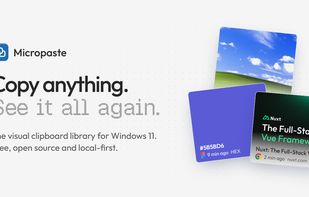
Micropaste is a visual clipboard library for Windows 11. Everything you copy is kept, shown as a rich card, and ready to reuse in a single click or drag.
Win+V forgets most of what you copy and shows the rest as a plain list. Micropaste keeps it all and turns it into a library you can browse, search and organize.
EVERY COPY BECOMES A CARD
• Text and code, with word, line and character counts
• Links, with the page title and image
• Images and screenshots, shown in full
• Colors (HEX, RGB, HSL, OKLCH) displayed as swatches
• SVG markup, rendered as the actual graphic
• Files and folders, with their real Windows thumbnails
Each card shows the app it was copied from and when.
REUSE IN ONE GESTURE
Click a card to copy it back, drag it straight into any app, or right-click to paste, share, save, add to favorites or collections.
COLLECTIONS AND FAVORITES
Group clips into your own collections, shown as tabs next to your history. Drop files, text or images from other apps straight into a collection. Star the clips you use all the time.
FIND ANYTHING
Ctrl+F searches everything, including link titles and the text inside your images and screenshots.
PRIVATE BY DESIGN
Your clips are stored only on your computer. No account, no cloud, no telemetry. Secrets copied from password managers are never recorded.
FEELS AT HOME ON WINDOWS 11
Mica material, light and dark themes, grid or list layout. Micropaste lives in the system tray, opens with Alt+Shift+V (or any shortcut you choose) and cleans up old clips by itself. Favorites and collections are kept forever.
Free and open source under the MIT license.






 EU


 David-Abou added Micropaste as alternative to Paste
 David-Abou added Micropaste as alternative to Ditto, Supaste, Rememory, CopyQ and 11 more


 David Abou


No comments or reviews, maybe you want to be first?