


Métamorphose
25 likes
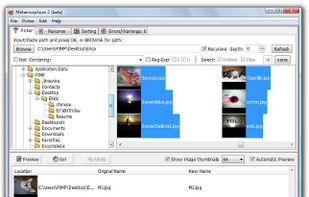
Batch tool for renaming files and folders with preview, undo, unlimited customizable operations, recursive subdirectory support, regular expressions, metadata handling, full unicode compatibility, multilingual filename management, and multi-platform use.

Cost / License
- Free
- Open Source (GPL-2.0)
Application type
Platforms
- Windows
- Linux
- BSD
- Oracle Solaris
- OpenSolaris


Features
Métamorphose News & Activities
Highlights All activities
Recent News
No news, maybe you know any news worth sharing?
Share a News Tip
Recent activities
 TylerSedacca added Métamorphose as alternative to PixelRank
 Alireza Noori added Métamorphose as alternative to Filewright
 vivenario added Métamorphose as alternative to ReTitle
 KharaApps added Métamorphose as alternative to Stamped
- Fla updated Métamorphose
- Paul updated Métamorphose
 app-maker added Métamorphose as alternative to FilesDesk
 renamer_ai added Métamorphose as alternative to Renamer.ai
 LibroGadget added Métamorphose as alternative to RenameIQ Pro
 Martin Knotek added Métamorphose as alternative to DataSmith2


Métamorphose information
Developed by
Ianaré SéviLicensing
Open Source (GPL-2.0) and Free product.Alternatives
69 alternatives listedBadge
Get an embeddable badge for MétamorphoseSupported Languages


Comments and Reviews
Metamorphose is a very powerful renaming utility. I must have gone through ten other renaming applications to test them before finding Metamorphose. I needed something that could rename files within subfolders of a parent directory, and this was the only one that worked!
The only problem that I have is that it freezes every now and again when dealing with too many files; which can be somewhat fixed by turning off the auto-preview, but I've had to restart it multiple times between renames.