Make Me Admin icon
Make Me Admin icon

Make Me Admin

 3 likes

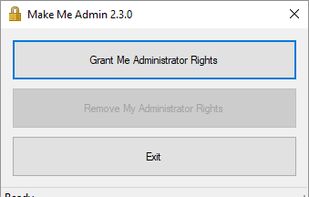
The user launches the Make Me Admin application. If they are authorized to obtain administrator rights, and they are not already an administrator, the “Grant Me Administrator Rights” button is enabled. When the user clicks the Grant button, a service, running in the background...
Make Me Admin screenshot 1

Cost / License

Since

  • Since 2019 (updated Mar 2026)

Releases

  • No releases last yearNone last year

GitHub

  • GitHub stars: 541

Platforms

  • Windows
3likes
0articles
Save

Features

Features

Highlights All activities

Make Me Admin News & Activities

Recent activities

No activities found.

Make Me Admin information

AlternativeTo Category

OS & Utilities

GitHub repository

  •  541 Stars
  •  121 Forks
  •  52 Open Issues
  •   Updated  
View on GitHub

Our users have written 1 comment or review about Make Me Admin, and it has gotten 3 likes.

Make Me Admin was added to AlternativeTo by scottcopus on and this page was last updated .

Comments and Reviews

   
0

Doesn't work reliably

Official Links

Install from the command line

  • winget install -e --id pseymour.MakeMeAdmin

Be careful what you paste into a terminal. Check what a command installs before running it.

What is Make Me Admin?

The user launches the Make Me Admin application. If they are authorized to obtain administrator rights, and they are not already an administrator, the “Grant Me Administrator Rights” button is enabled. When the user clicks the Grant button, a service, running in the background, adds the user to the Administrators group. The user application notifies the user, and it minimizes to the notification area. At this point, the user can perform the actions that require administrator rights. When prompted for credentials, they simply enter their current Windows credentials. After a configurable period, the user is removed from the Administrators group by the service. The user is notified of this, and the application closes.