
macmon icon
macmon icon

macmon

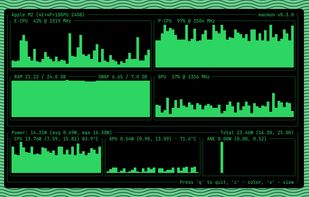
Get real-time Apple Silicon performance data without sudo, including CPU, GPU, RAM usage, power and temperature metrics, per-cluster utilization, RAM and swap stats, historical charts, color themes, and detailed system information directly via CLI.
macmon screenshot 1

Cost / License

  • Free
  • Open Source (MIT)

Platforms

  • Mac
  • Homebrew
2likes
0comments
0articles

Features

Properties

  1.  Privacy focused

Features

  1.  No registration required
  2.  No Tracking
  3.  Works Offline
  4.  Command line interface
  5.  Ad-free
  6.  Process Monitoring
  7.  Performance Monitoring
  8.  CPU Monitoring
  9.  RAM Monitoring
  10.  GPU Monitoring
  11.  Hardware Monitoring
  12.  Apple Silicon support

macmon News & Activities

Highlights All activities

Recent activities

  • Danilo_Venom updated macmon
  • TCP Viewer icon
    Danilo_Venom added macmon as alternative to TCP Viewer
  • pstop icon
    uniquegodwin added macmon as alternative to pstop
  • K0RR added macmon as alternative to rip-cli
  • babsors liked macmon

macmon information

  • Developed by

    vladkens
  • Licensing

    Open Source (MIT) and Free product.
  • Written in

  • Alternatives

    46 alternatives listed
  • Supported Languages

    • English

AlternativeTo Categories

OS & UtilitiesSystem & Hardware

GitHub repository

  •  1,688 Stars
  •  66 Forks
  •  12 Open Issues
  •   Updated  
View on GitHub
macmon was added to AlternativeTo by Paul on and this page was last updated .
No comments or reviews, maybe you want to be first?

What is macmon?

macmon is a performance monitoring Command Line Interface (CLI) tool engineered specifically for Apple Silicon processors. This tool has been designed to overcome the challenge of obtaining live power consumption data from these processors, which is not readily available. macmon employs a private macOS API to collect metrics, mirroring the functionality of powermetrics, but without the need for root privileges.

The feature set of macmon includes real-time monitoring of CPU, GPU, and ANE power usage, along with CPU utilization per cluster. It also provides insight into RAM and Swap usage, and presents historical charts with average and maximum values. The tool also provides data on average CPU and GPU temperatures. Aesthetically, macmon offers switchable color options with six variants and can be rendered in a small window for convenience. The software is written in Rust, a programming language known for its performance and memory safety.

Official Links