
Sandboxed icon
Sandboxed icon

Sandboxed

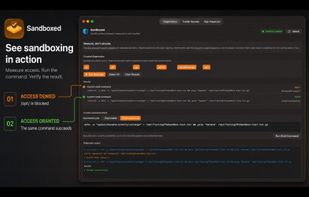
Analyze macOS sandbox limitations by running system binaries before and after directory access, explore which system binaries are restricted or allowed, experiment safely with permissions, and identify which applications on your system are sandboxed or unrestricted.
Sandboxed screenshot 1

Cost / License

  • Free
  • Proprietary

Platforms

  • Mac
0likes
0comments
0articles

Features

Properties

  1.  Privacy focused
  2.  Lightweight
  3.  User friendly
  4.  Educational

Features

  1.  No Tracking
  2.  No registration required
  3.  Works Offline
  4.  Dark Mode
  5.  Ad-free
  6.  Security Testing
  7.  Apple Silicon support
  8.  Graphical User Interface
  9.  Usability Testing

Sandboxed News & Activities

Highlights All activities

Recent activities

Sandboxed information

  • Developed by

    US flagInspirationull
  • Licensing

    Proprietary and Free product.
  • Alternatives

    3 alternatives listed
  • Supported Languages

    • English

AlternativeTo Categories

Security & PrivacyEducation & ReferenceOS & UtilitiesDevelopmentSystem & HardwareNetwork & Admin

GitHub repository

  •  0 Stars
  •  0 Forks
  •  0 Open Issues
  •   Updated  
Sandboxed was added to AlternativeTo by The Void on and this page was last updated .
No comments or reviews, maybe you want to be first?

What is Sandboxed?

The macOS sandbox is a secure and highly refined safety measure, it's enabled for all AppStore apps without exception. However there is a lot of misconceptions or partially true details on how it operates. Sandboxed is here to clear that up, it's a simple and straightforward tool that you can use to figure out how an app behaves in a sandbox.

There is a demo command that you can run before and after allowing access to a directory, showing that access to system binaries on specific directories is allowed. as long as you add the directory first. This applies to binaries signed by Apple, and it doesn't give you access to all of them, there are definitely restricted binaries as well, and this app lets you figure out which ones. And if you use a package manager or have your own binaries installed, those binaries will never run while using this app as the middleman.

Sandboxed also lets you see which of your other apps are Sandboxed and which are not. Whether you are a developer, or just a curious individual Sandboxed is here not just so you know how it operates, but so you feel how it operates.
