Your thoughts are yours alone.
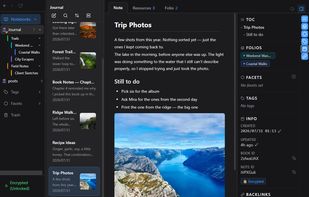
Lyunotes brings notes, a journal and your files together in one place. Every note has its own space for documents, photos, PDFs and more, organized into folders right beside the writing they belong to.
Location is clear. Encryption is checkable.
You choose where your data lives. It's stored under your own account, in the cloud storage you already use (currently Dropbox, OneDrive and iCloud), so there is no wondering where it actually is. Today, no Lyunotes server holds a copy of your notes.
Turn on optional zero-knowledge encryption for a notebook, and both its notes and files become unreadable to anyone without the key, including your cloud provider.
You don't have to take our word for it: open the encrypted files in your own cloud storage and see for yourself that they're unreadable without the key.
Not just notes, your files too.
Every note has its own space for files. Drag in documents, photos and PDFs, organize them into folders, and browse them in a thumbnail grid or a list.
In an unencrypted notebook, your files remain ordinary files and folders on disk, keeping their original names. Enable encryption for a notebook, and its files are encrypted too.
On smartphones, you can add files from your photo library or file picker, take photos, and scan paper documents directly into a note as PDFs.
On Windows, you can mount a note's files from an encrypted notebook as a virtual drive. The drive shows the same files and folders you see in Lyunotes, so you can open and edit them in other applications.
For daily journaling and organized notes alike.
- Diary theme: a journal with a quick-post composer and a calendar.
- Default theme: everyday notes, organized with folders, tags and folios.
Choose a theme for each notebook and change it any time.
Bring your own cloud.
Keep your notebooks synchronized between your PC and iPhone through your own cloud storage, without handing control of your files to another note-taking service.
Free to use, with no subscription.
Lyunotes is free to use, including syncing through your own cloud storage on Windows. On iPhone, cloud sync and certain other features are unlocked with Glyph, a one-time purchase (not a subscription).
Who it's for
- People who want their journal or notes kept truly private.
- People who want notes and related files organized together.
- People who want to manage documents through both a note-taking app and Windows.
- People who want to keep work and personal notes safely separate.
- People who want to choose their own cloud provider.
- People looking for an app with no ads and no account required.











No comments or reviews, maybe you want to be first?