

Lyric Video Studio
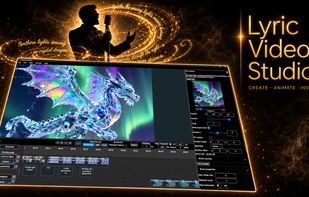
Lyric Video Studio is NLE video editor (windows & linux desktop native) dedicated for musicians, content creators and AI enthusiastics.
Cost / License
- Pay once
- Proprietary
Platforms
- Windows
- Linux
Features
Properties
- Lightweight
- Privacy focused
- AI-Powered
Features
- Dark Mode
- Chroma Key / Green Screen
- WYSIWYG Support
- Live Preview
- Colour Grading
- No Tracking
- Lossless Audio
- Extensible by Plugins/Extensions
- Works Offline
- Ad-free
- Support for Layers
- Hardware Accelerated
- No registration required
- Support for 4K
- Support for VST Plugins
- Transitions Effects
- Non Destructive Editing
- Keyframe Animation
- Support for Lyrics
Lyric Video Studio News & Activities
Recent activities
- codematium liked Lyric Video Studio
- Maoholguin added Lyric Video Studio as alternative to LyricEdits, TuneClip, LYRC and Karaoke Video Maker
- codematium added Lyric Video Studio
- Maoholguin updated Lyric Video Studio
Lyric Video Studio information
What is Lyric Video Studio?
Lyric Video Studio is a powerful editing tool for musicians, VJs, and video creators who want to create custom music videos with full creative control. The app supports lyric, music, and visualizer videos, making it ideal for those who need simple editing, video clipping, and text/subtitle work.
How it Works:
- Import or create a song of any genre
- Import, extract or generate lyrics, with manual editing or AI assistance
- Design your video by syncing lyrics, adjusting fonts, colors, effects, and animations
- Export ready for YouTube, TikTok, Instagram, or other platforms
What You Can Do:
- Auto-sync lyrics to your music or manually adjust timing
- Create audio-reactive visualizations with MilkDrop presets
- Generate visuals with AI or use your own, with support for all major models
- Customize fonts, colors, effects, transitions
- Export in any format without watermarks or restrictions
- Create unlimited videos without caps or limits
Who It's For:
- Musicians who want professional lyric videos without hiring an editor
- YouTubers & Content Creators who need high-quality, unique visuals
- VJs & AI Enthusiasts who enjoy experimenting with plugins and integrations
Try Before You Buy:
Test the trial version first, which includes all features but with limited timeline length and max resolution. Upgrade whenever you're ready.
For Power Users:
This is a tool for creators who want to edit, not just click. Use as much or as little of its power as you need. Local generative AI tools are available.



