
lvdExplorer icon
lvdExplorer icon

lvdExplorer

lvdExplorer is a fast, lightweight, and modern alternative to the default Windows File Explorer, created by lvdsystems. Designed for power users, developers, and everyday users seeking a cleaner, more flexible file navigation experience, lvdExplorer focuses on desktop...
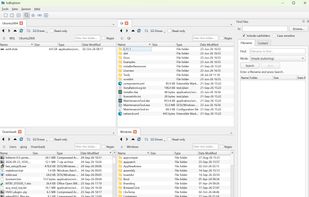
lvdExplorer screenshot 1

Cost / License

Application type

Platforms

  • Windows
  • Linux
0likes
0articles
Save

Features

Properties

  1.  Lightweight
  2.  Privacy focused
  3.  Support for Themes

Features

  1.  Portable
  2.  No Tracking
  3.  No registration required
  4.  Dark Mode
  5.  Full-Text Search
  6.  Batch Rename Files
  7.  Ad-free
  8.  Works Offline

lvdExplorer News & Activities

Highlights All activities

Recent activities

lvdExplorer information

AlternativeTo Category

File Management

GitHub repository

  •  0 Stars
  •  0 Forks
  •  0 Open Issues
  •   Updated  
View on GitHub
lvdExplorer was added to AlternativeTo by Giorgio-Delmondo on and this page was last updated .

No comments or reviews, maybe you want to be first?

What is lvdExplorer?

lvdExplorer is a fast, lightweight, and modern alternative to the default Windows File Explorer, created by lvdsystems. Designed for power users, developers, and everyday users seeking a cleaner, more flexible file navigation experience, lvdExplorer focuses on desktop productivity without bloated dependencies or system overhead.

Built on C++ and Qt, lvdExplorer provides a native, responsive desktop interface that opens instantly and handles complex file management operations smoothly—even across large directory trees and deep network shares.

Key Features & Highlights: Multi-Tab Navigation: Work with multiple folder locations simultaneously within a single window. Reorder, duplicate, and manage tabs effortlessly to streamline your workflow.

Dual-Pane & Flexible Layouts: Split your view side-by-side or stacked to seamlessly copy, move, and compare files between directories without juggling multiple open windows.

Modern & Responsive UI: Clean, clutter-free user experience featuring native system integration, dark mode support, and full keyboard navigation.

Fast Directory Indexing & Search: Locate files and folders quickly with responsive filtering and low memory overhead.

Bookmarks & Quick Access: Organize frequently used directories into custom, categorized sidebar shortcuts or persistent workspace profiles.

Keyboard Shortcut Driven: Perform common file actions—renaming, moving, viewing properties, opening terminals—entirely via customizable keyboard commands.

Portable & Lightweight: Zero background telemetry, ad-free, and designed to run with minimal CPU and RAM usage.

