
Luviosa icon
Luviosa icon

Luviosa

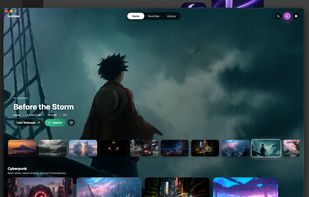
Luviosa is a macOS live wallpaper app I built to make the desktop feel more cinematic, personal, and alive.
Luviosa screenshot 1

Cost / License

Platforms

  • Mac
0likes
0comments
0articles

Features

Properties

  1.  Privacy focused

Features

  1.  No Tracking
  2.  Video Wallpaper
  3.  No registration required
  4.  Support for Multiple Monitors
  5.  Live Preview
  6.  Live Wallpapers
  7.  Ad-free
  8.  Dark Mode
  9.  Sits in the MenuBar

Luviosa News & Activities

Highlights All activities

Recent activities

Luviosa information

  • Developed by

    CA flagShubham Kaila
  • Licensing

    Open Source (GPL-3.0) and Free product.
  • Written in

  • Alternatives

    51 alternatives listed
  • Supported Languages

    • English

AlternativeTo Category

Photos & Graphics

GitHub repository

  •  2 Stars
  •  0 Forks
  •  0 Open Issues
  •   Updated  
View on GitHub
Luviosa was added to AlternativeTo by Paul on and this page was last updated .
No comments or reviews, maybe you want to be first?

What is Luviosa?

Luviosa is a macOS live wallpaper app I built to make the desktop feel more cinematic, personal, and alive.

What Luviosa does:

Luviosa lets you browse curated live wallpapers and apply them directly to your macOS desktop. The app includes a fullscreen, media-forward interface for discovering wallpapers, plus support for importing your own videos, GIFs, and images.

The goal is simple: make live wallpapers feel native to macOS, fast enough to keep running, and polished enough to enjoy every day.

Features:

  • Curated live wallpaper library with category rows for Anime, Nature, Cyberpunk, Fantasy, Space, Automotive, Ocean, and more.
  • User imports for videos, GIFs, and images.
  • Multi-display selection with persistent display preferences.
  • Menu bar app mode with no Dock icon.
  • Persistent playback preferences for pause behavior, volume, and active wallpaper assignments.
  • Favorites tab for saved wallpapers.
  • Search across wallpaper titles, subtitles, and tags.
  • Full-window animated app backdrop based on the selected wallpaper.
  • Wallpaper preview, favorite, and apply controls.
  • Native macOS settings panel for displays, playback, and library management.
  • Lightweight AVFoundation playback using desktop-level wallpaper windows.

Official Links
