
LOOM: Live Looper icon

LOOM: Live Looper

LOOM is a live looping application for MacOS that lets you perform hands-free. Arrange all the button presses and mixer changes up front and press the perform button, then focus on the music - not the looper. Traditional style manual looping is also a first class citizen.
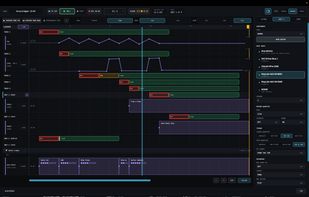
Arrange View

Cost / License

  • Pay once
  • Proprietary

Application type

Platforms

  • Mac  Works on MacOS 13.3 and up and requires 8GB RAM and a decent amount of storage to record longer performances.
0likes
0articles
Save

Features

  1.  Dark Mode
  2.  Support for MIDI
  3.  Live Performance
  4.  Music Looper
  5.  Lossless Audio
  6.  Music Sequencer
  7.  Ad-free
  8.  Works Offline
  9.  Virtual Instrument
  10.  No registration required
  11.  Live Looping

LOOM: Live Looper News & Activities

Highlights All activities

Recent activities

LOOM: Live Looper information

AlternativeTo Category

Audio & Music

Popular alternatives

View all
LOOM: Live Looper was added to AlternativeTo by zachswift on and this page was last updated .

No comments or reviews, maybe you want to be first?

Official Links

What is LOOM: Live Looper?

LOOM is a live looping application for MacOS that lets you perform hands-free. Arrange all the button presses and mixer changes up front and press the perform button, then focus on the music - not the looper.

Traditional style manual looping is also a first class citizen. You can jam out a set of loops in "looper" view, which is reminiscent of a tabletop hardware looper, add effects, balance the mix and control the looper with a MIDI controller. Then either perform manually if you wish, or take it to "arrange" view and draw the button presses via a familiar timeline layout. Draw the record, overdub and play regions, effect preset changes, mixer changes, or any of hundreds of other automatable parameters.

You can perform by pluggin in an acoustic or electric guitar, putting the amp simulator on the input track effect rack, or mic'ing up any instrument and record to any of the 5 audio tracks. OR you can use the virtual instruments included with LOOM - just plug in a MIDI controller and dial in the synth, drum or sampler sound you want and perform it on one of the 4 Instrument tracks.

When your performance is designed out, you can press the "Perform from top" button in the arrange view and you go go from instrument to instrument, or stay on your single midi controller and have it automatically switch between the virtual instruments - or both. Your loops tracks record, overdub, play and stop as you designed them to and the audience doesn't have to wait while you operate the looper buttons.

LOOM: Live Looper Videos
