





Lockish
Like
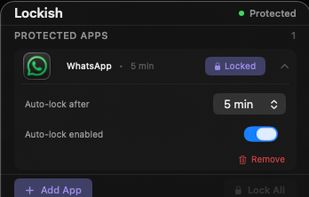
Lockish puts Touch ID in front of the apps you choose, like Messages, WhatsApp, your bank or your email, and leaves the rest of your Mac open. Lock them yourself with one click when you step away (everything at once, or one app), or let each app lock itself after you switch away...

Cost / License
- Pay once
- Proprietary
Platforms
- Mac


Features
Highlights All activities
Lockish News & Activities
Recent activities
- Appish updated Lockish
 swat777 added Lockish as alternative to PresenceLock
- Appish added Lockish
 Appish added Lockish as alternative to Cold Turkey, Fomi, ClearSpace, Atten and 21 more


Developed by
 Appish
 Licensing
Proprietary and Commercial product.Pricing
One time purchase (perpetual license) that costs $10.Alternatives
26 alternatives listedBadge
Get an embeddable badge for LockishSupported Languages


No comments or reviews, maybe you want to be first?