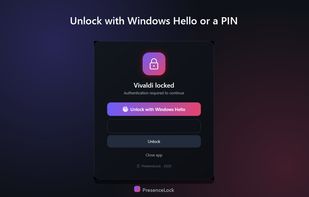
PresenceLock puts a password on individual Windows apps, the way a phone lets you lock a single app. You choose which apps to protect - banking, mail, chat, a journal, work tools - and each one asks to be unlocked before it will open.
Unlock it your way: Windows Hello (face or fingerprint), a backup PIN, a trusted Wi-Fi network, or your phone nearby over Bluetooth. Any method you switch on will do, and you can change them at any time.
It is presence-aware. Step away from the desk and protected apps lock themselves again, so you never have to remember to do it. You decide how quickly that happens, so it can be tight when you want it or relaxed when you are just getting coffee.
The details: a separate friend password lets someone use the laptop for a minute without ever learning your own code; schedules keep chosen apps locked during set hours; an activity log shows when protected apps were opened and unlocked; and locking can be paused on demand for a presentation. Pausing, quitting and changing settings all ask for your code first, and if the app is ended from Task Manager it starts again within about a minute and re-locks.
Everything stays on the PC. No cloud, no account, no tracking. Protected apps, schedules and the activity log live only on your computer, and PINs are stored solely as salted one-way hashes encrypted with Windows DPAPI. Available in six languages.
Worth being clear about the scope: this is a strong privacy and convenience lock, not full-disk encryption. It stops someone who grabs your already-signed-in PC from opening your apps, but a determined technical person could work around it, so for truly sensitive data use it alongside BitLocker and a locked Windows account.
There is a free 24-hour trial through the Microsoft Store, so the whole app can be tried before buying.






 swat777 added PresenceLock as alternative to Cisdem AppCrypt, Cold Turkey, iLocker, Twert and 4 more
 Hearth Software


No comments or reviews, maybe you want to be first?