
LocalDMS icon
LocalDMS icon

LocalDMS

Browser-based electronic document management system (EDMS) that runs on your own Windows server or as hosted SaaS, with version control, audit trails, approval workflows and full-text search.
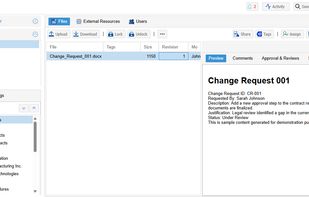
Document explorer with the folder tree, file list, and an in-browser preview of a selected document, with tabs for comments, approvals, versions and tags.

Cost / License

  • Freemium (Pay once or Subscription)
  • Proprietary

Application type

Platforms

  • Online
  • Software as a Service (SaaS)
0likes
0articles
Save

Features

Properties

  1.  Support for Themes
  2.  Privacy focused

Features

  1.  Hierarchical Structure
  2.  File Tagging
  3.  Real time collaboration
  4.  Ad-free
  5.  Dark Mode
  6.  Full-Text Search
  7.  File Versioning
  8.  Built-in viewer
  9.  On-premises software
  10.  Team Collaboration
  11.  Workflow

LocalDMS News & Activities

Highlights All activities

Recent activities

LocalDMS information

  • Developed by

    US flagGoda Software, Inc
  • Licensing

    Proprietary and Freemium product.
  • Pricing

    One time purchase (perpetual license) ranging between $750 and $5000 + free version with limited functionality.
  • Alternatives

    2 alternatives listed
  • Badge

    Get an embeddable badge for LocalDMS
  • Supported Languages

    • English
LocalDMS was added to AlternativeTo by rajudatla on and this page was last updated .

No comments or reviews, maybe you want to be first?

Official Links

What is LocalDMS?

LocalDMS is an electronic document management system (EDMS) for teams that need controlled documents. It is installed on a Windows server on your own network, or used as a hosted SaaS service. Users work entirely in a web browser (Chrome, Edge, Safari), so no client software is installed on individual machines.

Main capabilities:

  • Automatic version control with full revision history and retrieval of earlier versions
  • Immutable audit trail that logs every user action
  • Review and approval workflows with task assignments, comments and electronic sign-offs
  • Full-text search across document content, metadata and filenames
  • In-browser document preview
  • Permissions by role, workspace, folder or individual user
  • Active Directory / LDAP integration
  • Tagging and folder-based organization
  • Built-in scheduled backups

Deployment:

  • On-premises: installs on a Windows server in under 5 minutes. The installer bundles its own database, so no separate database server is required. Supports Active Directory / LDAP sign-in.
  • SaaS: also available as a hosted service, with updates and daily backups managed by the vendor. No server installation required.

Licensing: the Community Edition is free for up to 10 users with no time limit. Paid on-premises editions are perpetual licenses (Professional up to 20 users, Business up to 50, Corporate up to 250, Enterprise above that), with optional annual maintenance. SaaS pricing is quoted separately.
