LinScreen icon
LinScreen icon

LinScreen

 Like

One-click area screenshots for Linux (Wayland and X11): tray app that writes its hotkey into Hyprland, Sway, i3 and Niri configs.
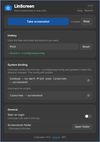
Settings window, dark theme
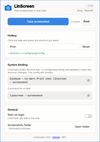
Settings window, light theme

Cost / License

  • Free
  • Open Source (MIT)

Since

  • New

Updated

  • Updated Oct 2026

Platforms

  • Linux
0likes
0articles
Save

Features

Properties

Features

Highlights All activities

LinScreen News & Activities

Recent activities

LinScreen information

AlternativeTo Categories

Photos & Graphics, OS & Utilities

GitHub repository

  •  0 Stars
  •  0 Forks
  •  0 Open Issues
  •   Updated  
View on GitHub

Popular alternatives

View all
LinScreen was added to AlternativeTo by FPP on and this page was last updated .

No comments or reviews, maybe you want to be first?

Official Links

What is LinScreen?

LinScreen is a simple tray app for area screenshots on Linux. Hit a hotkey, pick an area, and the shot is copied to the clipboard and saved as a file.

It works on Hyprland (including Omarchy), Sway, i3, Niri, KDE Plasma, GNOME and X11, and picks a working capture tool for your desktop automatically: grim and slurp on wlroots compositors, Spectacle on KDE, gnome-screenshot on GNOME, xdg-desktop-portal as a Wayland fallback, and maim or scrot on X11.

On Hyprland, Sway, i3 and Niri, LinScreen writes the hotkey into your compositor config for you. It keeps its lines in a marked block, makes a dated backup before editing, and rolls the change back if Hyprland reports a config error after reload.

The settings window follows your system light or dark theme. Packages are available for Arch Linux, Debian/Ubuntu and Fedora.