




LinMBC
Like
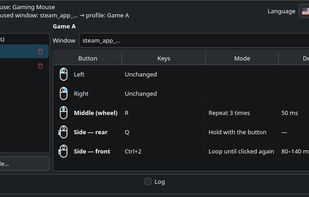
LinMBC remaps mouse buttons to keys and key combos per application on Linux, and switches the active profile by itself when the focused window changes. It is a Linux take on X-Mouse Button Control, built for Wayland first.

Cost / License
- Free
- Open Source (MIT)
Application typeApplication types
Platforms
- Linux
- Arch Linux


Features
Highlights All activities
LinMBC News & Activities
Recent activities
- Johnson Lima added LinMBC
 Johnson Lima added LinMBC as alternative to X-Mouse Button Control, Input Remapper and Piper

Developed by
 Johnson Mauro
 Licensing
Open Source (MIT) and Free product.Written in
Alternatives
3 alternatives listedBadge
Get an embeddable badge for LinMBCSupported Languages

AlternativeTo Categories
OS & Utilities, System & Hardware, Gaming SoftwareGitHub repository
- 0 Stars
- 0 Forks
- 0 Open Issues
- Updated


No comments or reviews, maybe you want to be first?