
LinkUnzip icon
LinkUnzip icon

LinkUnzip

Extract a ZIP straight from a link into a folder, without ever saving the ZIP. Chrome/Edge/Brave extension + small Rust helper for Windows. Free, open source (GPL-3.0).
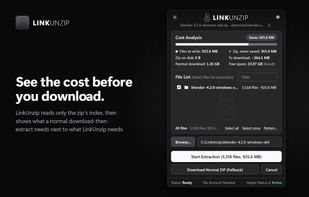
LinkUnzip screenshot 1

Cost / License

Platforms

  • Microsoft Edge
  • Google Chrome
  • Brave
0likes
0articles
Save

Features

Properties

  1.  Lightweight
  2.  Privacy focused

Features

  1.  Ad-free
  2.  Dark Mode
  3.  Supports Zip files
  4.  No Tracking
  5.  No registration required
  6.  Browser extension
  7.  File Archiving

LinkUnzip News & Activities

Highlights All activities

Recent activities

LinkUnzip information

AlternativeTo Categories

File Management, Web Browsers, File Sharing

GitHub repository

  •  0 Stars
  •  0 Forks
  •  0 Open Issues
  •   Updated  
View on GitHub
LinkUnzip was added to AlternativeTo by Alex Cinca on and this page was last updated .

No comments or reviews, maybe you want to be first?

Official Links

What is LinkUnzip?

LinkUnzip is a browser extension for Chrome, Edge and Brave with a small Windows helper. Right-click a link to a zip and choose "Extract with LinkUnzip": the files go straight into a folder and the zip itself is never saved, so your disk only needs room for the files.

Before anything is downloaded, it shows what's inside the zip and how much space it needs compared to a normal download and extract. You can take everything or just the files you want; the rest is never downloaded. Every file is checked as it arrives.

Free and open source. No account, no ads, no tracking. Windows 10/11 for now; the helper installs without administrator rights.

LinkUnzip Videos