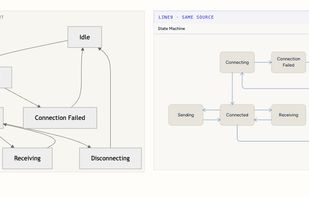
Line9 is a rendering engine and publishing system for Mermaid diagrams. It uses standard Mermaid syntax but produces flowcharts that are laid out with:
- aspect ratios that fit a screen or page,
- shorter arrows with fewer crossings that can be followed more easily,
- tidy, regular shape positions and sizes,
- labels placed cleanly on the correct line.
These improvements over the standard layout engines enable Line9 to produce diagrams that are usable immediately, without the need to import your Mermaid flowchart into a diagram 'editor', or reproduce it in some other diagramming tool. Line9 produces diagrams that are ready-to-use and can be presented, shared and published without any additional effort.
How to use Line9
View a diagram you already have – See it with Line9’s readable and stylish rendering by pasting your text directly into the diagram editor page. In many cases you’ll get a more usable diagram than you started with. Alternatively, if your diagrams are on disk, use the Line9 CLI with the command "line9 render <diagram.mmd>". Rendered diagrams can easily be exported or shared.
Create a new diagram by hand – Open the diagram editor page and write Mermaid source text into the text panel: your diagram will appear as you go. Working this way has long been the standard process for Mermaid flowchart creation. What’s different with Line9 is that your creative effort is rewarded with a diagram that you’ll be able to use, because it has layout that fits in a screen whilst remaining readable.
Create diagrams with AI agents – Creating flowchart diagrams with AI is made possible by an AI agent with access to Line9’s CLI tool. Simply ask the AI to create a flowchart to reveal the logic and processes that document and explain your systems, your procedures, your code. The AI will create the Mermaid and then show you the diagram directly in a locally-delivered browser page.
Should you need to share a flowchart then publishing to your Line9 Pro account is seamless and fast — just click the button in the diagram page or enter "line9 publish <diagram.mmd>" at the command line.
The web viewer at line9.ai is free with no signup, and the CLI (line9 render) is free for personal use (with watermarked images). Pro is $10/$12 per seat per month (annual/monthly billing) and adds commercial use, watermark removal, publishing features and pro themes.
Line9 is not affiliated with the Mermaid project and is closed source. It's free to use, and the Mermaid you write is always yours to take anywhere.








 Moverve Limited


No comments or reviews, maybe you want to be first?