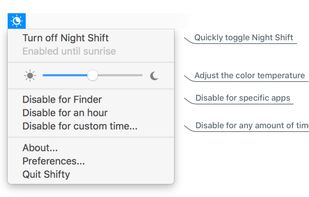
Shifty was made to expand the capabilities of the built in Night Shift feature in macOS. You can disable Night Shift for specific apps and custom time periods. It also provides easy access to a slider to fine tune your color temperature.

LightBulb is described as 'Background application that adjusts screen gamma, making the colors appear warmer at night, reducing strain on your eyes' and is a very popular color temperature tool in the os & utilities category. There are more than 50 alternatives to LightBulb for a variety of platforms, including Windows, Linux, Mac, Android and Wayland apps. The best LightBulb alternative is f.lux, which is free. Other great apps like LightBulb are Redshift, Red Moon, Iris mini and RedshiftGUI.
Shifty was made to expand the capabilities of the built in Night Shift feature in macOS. You can disable Night Shift for specific apps and custom time periods. It also provides easy access to a slider to fine tune your color temperature.

Free software for eye protection and more! It protects your eyes while you are working on the computer. Eye Saver has three main functions: blue light filter; eliminates the invisible flickering of the display backlight; reminds you to take breaks;


CareUEyes is a very simple but useful program when it is about your eye care. The program comes with a very simple and clean interface and needs to technical knowledge. Even a novice computer user can download and use it easily.


Do you use your mobile phone after sunset? Do you use your phone within three hours of your bed time? If yes, then your device might be taking your sleep away. Bluelight from your mobile screens sends a signal to brain to wake up, and makes it difficult for us to sleep at night.


Night Shift: Blue Light Filter is the most popular Android Tablet alternative to LightBulb.
CF.lumen - don't let your phone blind you! CF.lumen changes the colors of your Android device's display based on the position of the sun. With the default settings, your display will get a warmer tint (lower color temperature) when the sun is down, to look more like indoo.

To schedule Night Light so it turns on automatically, select Start > Settings > System > Display > Night light > Night light settings.


Inspired by Redshift, Blueshift adjusts the colour temperature of your monitor according to brightness outside to reduce eye strain and make it easier to fall asleep when going to bed.
Night Screen is created for those people who spend a lot of time at night working.
Limit your exposure to energy-efficient lighting before bed. In addition to the LED screens in your electronics, energy-efficient lighting emits a lot of blue light.


A Python program that calculates ambient brightness and sets screen's correct backlight using a camera.

Worlds first Myopic Defocus effect. Applies a Myopic Defocus effect on any website. This makes the screen look on the retina naturally as if it was at a greater distance. People report it being more convenient to look at.

World's 1st instantaneous content-aware brightness control app that let your screen brightness adapt instantly and automatically to provide the most optimal viewing experience for your eyes.


Forgets its job when power saving features kick in.