





lidawake
Like
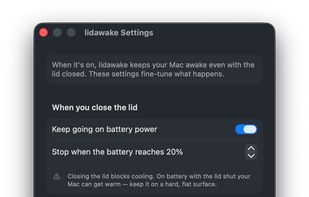
lidawake keeps your Mac awake with the lid closed — for an overnight job with no monitor attached, or an external monitor in clamshell mode on battery. Keeping a Mac awake is easy — stopping safely is the product: it watches heat and battery, and hands sleep back even if the app crashes.

Cost / License
- Pay once
- Open Source (MIT)
Application type
 EU
EUPlatforms
- Mac


Features
lidawake News & Activities
Highlights All activities
Recent activities
- zayco-it updated lidawake
- zayco-it updated lidawake
- zayco-it updated lidawake
- zayco-it updated lidawake
- zayco-it added lidawake
- Mauricio B. Holguin updated lidawake
 zayco-it added lidawake as alternative to Amphetamine, Caffeine for Mac, KeepingYouAwake, SleepLess and 6 more

lidawake information
Developed by
 zaYco s. r. o.
 Licensing
Open Source (MIT) and Commercial product.Pricing
One time purchase (perpetual license) ranging between $19 and $29.Written in
Alternatives
10 alternatives listedBadge
Get an embeddable badge for lidawakeSupported Languages

AlternativeTo Category
OS & UtilitiesGitHub repository
- 0 Stars
- 0 Forks
- 0 Open Issues
- Updated


No comments or reviews, maybe you want to be first?