
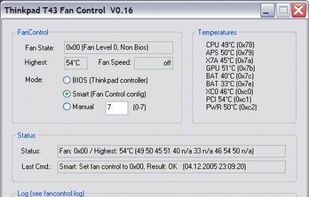
Solution to the cooling fan noise annoyances Thinkpad T4x (T40/T41/T42/T43) notebook series. Allows the user to control fan activity based on the system temperature. Win XP Visual C++ project controls the fan via port IO to the embedded controller.
The best System Information alternative to Libre Hardware Monitor is HWiNFO (32/64), which is free for personal use. If that doesn't suit you, our users have ranked more than 50 alternatives to Libre Hardware Monitor and many of them are System Information Utilities so hopefully you can find a suitable replacement. Other interesting System Information Utility alternatives to Libre Hardware Monitor are Rainmeter, AIDA64, Open Hardware Monitor and Mission Center.
Solution to the cooling fan noise annoyances Thinkpad T4x (T40/T41/T42/T43) notebook series. Allows the user to control fan activity based on the system temperature. Win XP Visual C++ project controls the fan via port IO to the embedded controller.

A simple application to view your exact hardware on macOS. Similar to About This Mac, but with more features, including AMD Processor Support, display resolution, and more! It retains the old "About This Mac" design language and is supported on both Hackintoshes and...


Monitors CPU, GPU, memory, storage, network and fan sensors in real time, showing why a reading is unavailable instead of supplying an estimate. Includes S.M.A.R.T. drive health, end-task controls, dead-pixel checks, plus an hour of in-memory history and JSON reports.


AI-powered hardware monitoring for Windows. Real-time system health, predictive alerts, and smart diagnostics. Free for home use.


Lightweight Windows hardware monitor that displays CPU and GPU temperatures in the system tray, with a customizable OSD and built-in FPS counter.


