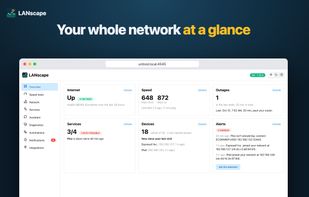
LANscape is a free, open-source (MIT) home network monitor you run yourself, on Umbrel or any Linux machine with Docker. Everything stays on your hardware: no account, no cloud, no telemetry.
It answers the questions you actually have about your network:
- Is it my internet provider or my Wi-Fi? Ping checks every minute to your router and the internet spot outages and tell you which side the problem was on. A 0–100 health score sums up uptime, packet loss, ping and jitter.
- How fast is my connection, really? Scheduled speed tests build a history from a day to all time, plus a weekly pattern by day and hour against the speeds you pay for.
- What's on my network? Every device from ARP, mDNS, UPnP and DHCP, with maker, model, name and history. Phones and laptops keep their identity even when they switch to a new private MAC address.
- What is that device running? Port scans show each device's open ports and what actually answers on them (Pi-hole, Home Assistant, Plex, OpenSSH…), with an alert when a device opens a new port.
- Are my home services up? HTTP, TCP and DNS checks for things like a NAS, Home Assistant or Pi-hole, with down and back alerts and 24-hour uptime.
Alerts go to ntfy, Telegram, Discord, Slack or any webhook, from rules on speed, ping or packet loss, new devices, devices going offline or coming home, outages and services. Diagnostics checks the path from the router to the internet in one click and gives you a report to send your ISP, along with an optional weekly summary.
An optional AI assistant answers questions about your network in plain language, with a model on your own network (like Ollama) or Claude or OpenAI, and shows exactly which data it read. A read-only MCP server lets AI agents like Claude or OpenClaw query it too.
Also: backup and restore with optional encryption, CSV export, Pi-hole integration, and light and dark themes that work on phones.









 SuarezLuis added LANscape as alternative to Fing, NetAlertX, WatchYourLAN, PingPlotter and 7 more

 Luis Suarez



No comments or reviews, maybe you want to be first?