Knetmeister 3D Expert is an easy 3D sculpting program for people who want to create their own figures for 3D printing – without complicated menus or CAD skills. It is made for beginners, families, kids and makers.
You start with a basic shape and sculpt it with your mouse, pen or finger: build up, push in, smooth, grab, inflate and flatten. When you are done, export your model as STL or OBJ for your 3D printer.
Expert tools:
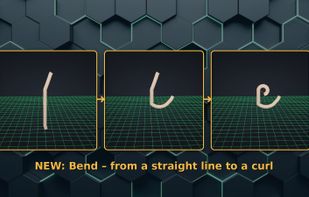
• Bend – kink an arm, leg or tail at the joint
• Stamp – press on textures like hair, fur, scales, stone and leaves
• Gizmo – add body, legs, ears and arms and place them exactly
• Reference image – load a picture and sculpt your figure right on top
• Ready-made parts – dragon head, wings, tail, alien head, tentacle and more
• Mirror mode, second layer, history, grid with size in mm
• Built-in picture help for every tool (before / how to / after)
Key points:
• Direct digital sculpting – easy to learn, no CAD skills needed
• Mouse, pen or finger (touch) supported
• Left-handed and right-handed mode
• English and German
• Runs locally – no subscription, no cloud, no ads
• Everything you sculpt belongs to you – you may print and sell your figures
• Available for Windows (Microsoft Store, 7-day free trial) and Android tablets and phones
• Free trial version that runs directly in the browser
Knetmeister 3D comes in three editions:
• Knetmeister 3D Beginner (Windows) – easy 3D modeling software for beginners and kids: sculpt, cut, drill holes and add ready-made body parts. With picture help for every tool, a layer preview just like in your slicer and a print preview for overhangs and thin walls.
• Knetmeister 3D Expert (Windows) – more tools for big 3D printed figures: bend at the joint, gizmo, reference image, stamps, more parts and your own colors and design.
• Knetmeister 3D Expert for Android – all the Expert tools on your tablet or phone, with your finger or with a pen.
All three editions: left-handed mode (the tools switch sides) and English and German – switch with one click or tap.
Many users find Blender or ZBrush too complicated for a quick figure to print. Knetmeister 3D focuses only on sculpting printable figures, so you can start right away.







 Knetmeister3D added Knetmeister 3D Expert as alternative to Blender, ZBrush, Nomad Sculpt and Autodesk Tinkercad
 Marcel Steiner


No comments or reviews, maybe you want to be first?