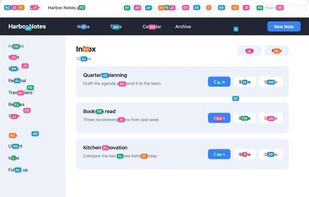
Keyfari lets you use macOS without reaching for the mouse. Press a shortcut and every clickable element of the focused window, the menu bar and the menu bar extras gets a short label; type the label to click it. Modifier keys turn the click into a right click, a double click or a command-click.
Search mode filters elements by their text instead, including Chinese text by its pinyin. Scroll mode scrolls with H J K L, with half pages and jumps to the top and bottom.
For windows that expose little to the accessibility system, such as canvas-drawn interfaces, Keyfari can recognise on-screen text on the device with Apple's Vision framework and label that too.
It lives in the menu bar, has no telemetry and makes no network requests. Shortcuts, label letters, themes and scroll speed can be changed, and the interface is available in English, Chinese and Japanese.
Keyfari is free and open source under GPL-3.0. It is a rewrite of Vimac, which is no longer maintained.









No comments or reviews, maybe you want to be first?