
KeibiDrop icon
KeibiDrop icon

KeibiDrop

Mounts another computer's folder as a normal folder on yours, and streams each file on demand as you open it and edit it.
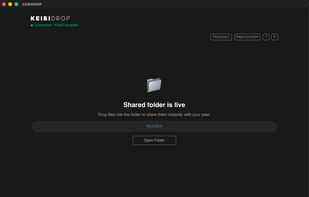
UI screen of KeibiDrop once the connection is live, and the filesystem is mounted. Now you can browse and use the shared files in real time.

Cost / License

Platforms

  • Mac  Requires macFUSE (https://macfuse.github.io/) for the live mount folder to work.
  • Windows  Requires WinFSP (https://winfsp.dev/ ) for the live mount folder to work.
  • Linux  Virtual folder mode needs libfuse3, which most distributions already have.
  • Android  It is not on google play store, it is distributed via F-Droid (self hosted) [https://fdroid.keibisoft.com/fdroid/repo/](https://fdroid.keibisoft.com/fdroid/repo/)
0likes
0comments
0articles

Features

Properties

  1.  Privacy focused

Features

  1.  End-to-End Encryption
  2.  Filesystem
  3.  Cross-Platform
  4.  Peer-To-Peer
  5.  Rust

KeibiDrop News & Activities

Highlights All activities

Recent activities

KeibiDrop information

  • Developed by

    RO flagKeibiSoft
  • Licensing

    Open Source (MPL-2.0) and Free product.
  • Written in

  • Alternatives

    7 alternatives listed
  • Supported Languages

    • English

AlternativeTo Categories

File SharingSecurity & PrivacyOS & Utilities

GitHub repository

  •  55 Stars
  •  1 Forks
  •  8 Open Issues
  •   Updated  
View on GitHub
KeibiDrop was added to AlternativeTo by marius-cristian on and this page was last updated .
No comments or reviews, maybe you want to be first?

What is KeibiDrop?

KeibiDrop connects two computers directly and shows one machine's folder as an ordinary folder on the other. There is no upload step and no copy: file contents stream across the internet as your applications read them, so opening one 5 MB file out of a 500 GB tree moves 5 MB.

Because it is a real filesystem, the software already installed keeps working. Finder and Explorer browse it, git clones from it, ffmpeg reads from it, and an editor saves back to it, you can use it with Blender, Premier, or any generic application on your computer. Both people can write, and when two saves genuinely cross, the newer one keeps the name and the other is kept beside it on both machines. You can use your Windows local software for data that is on Linux, or any combinations. You can also use it to mount files from Android and instantly open them on your desktop.

Sessions are end-to-end encryption with post quantum encryption. No accounts and no email addresses required.

KeibiDrop Videos

Show 1 more video

Official Links

