There exist a lot of screen recorders, but all lack the speed for doing some full screen recording. The speed is just to low or cpu to high.

Free Cam is described as 'Is free screen recording software for Windows that lets you easily capture all or part of your screen, record your voice & mouse clicks, then edit your video and save it to your computer or share it instantly on YouTube' and is a screenshot capture tool in the video & movies category. There are more than 100 alternatives to Free Cam for a variety of platforms, including Windows, Mac, Web-based, Linux and Android apps. The best Free Cam alternative is OBS Studio, which is both free and Open Source. Other great apps like Free Cam are SimpleScreenRecorder, Bandicam, FastStone Capture and VokoscreenNG.
There exist a lot of screen recorders, but all lack the speed for doing some full screen recording. The speed is just to low or cpu to high.

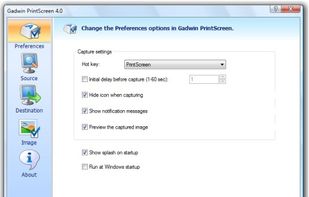
Captures the contents of the screen with a single keystroke. The captured screen can then be sent to the printer, or saved to disk as a file in 6 different graphics file formats. 15 languages.

Quick and easy screen recording software for demonstrations and tutorials. Audio and video desktop screen recording as Flash movies.
Snapz Pro X allows you to effortlessly record anything on your screen, saving it as a QuickTime® movie or screenshot that can be e-mailed, put up on the web, or passed around however you want.


Kingshiper Screen Recorder for Mac is a powerful and user-friendly software tool designed for capturing screen activity on your Mac. It provides various recording modes, you can select one to begin your recording to suit your specific needs.


Capture HD video at 60 FPS, record iOS devices, and edit screen or image content with annotation, voiceover, and advanced file management. Includes fullscreen, selection, and web capture, quick sharing to cloud, FTP, YouTube, and fast search for Mac users.


liteCam HD is the most intuitive and powerful professional screen recording software for Windows PC around. Capture and record anything on your computer screen in full HD from streaming videos, webinars, live game play, and more.


Screenbird is a browser based, no-sign in screen recorder. It's cross platform, and built for collaboration. From there you can push videos to Youtube, or create an outline for it, download a copy for backup.


Gecata by Movavi is a lightweight game recording software for PCs that lets you capture gameplay or a Windows desktop with one click and no lags.


Snappy is a desktop-capture software for Microsoft Windows that allows to capture the screen of your monitor. Compared to other similar applications, Snappy could be less complete, but my purpose is to keep it as immediate as I can. Try it, and let me know if I'm wrong...