PGui
Homepage: https://prog.nalle.no
Download installer: https://prog.nalle.no/nb/home/ipgui
Background
Earlier versions of Microsoft Windows included a simple graphical tool called «winipcfg» for viewing and managing IP addresses. This utility was discontinued after Windows ME, leaving only command-line tools and more complex network settings for users. IPGui is inspired by Winipcfg and brings back a straightforward, user-friendly interface for viewing and refreshing your IP configuration on modern Windows systems.
It has since been developed int oa swiss army knife of the network tools.
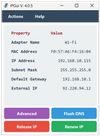
This is just a simple Graphic user interface for ipconfig. It will show the most importnt IP addresses with a possibility for «Advanced» mode showinw «ipconfig /all» in the window.
It is also capable of releasing and refreshing the IP address via DHCP and also flush the DNS cache.
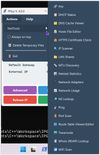
In the «Action» menu you will find an «Always on top» selection. That lets your application lay over other active programs for comparing.
The menu also has a NetTools submenu containing:
Arp:
(Address Resolution Protocol) fuctionality.
WiFi Scanner
Scanning for and showing the strength of the nearby WiFi connections.
Network adapter discovery tool:
Shows your network adapters.
HTTPS Certificate check:
This tool can see what certificate a web site has and even delete a locally stored certificate, if needed.
MTU Discovery
To set your MTU (Maximum Transmission Unit).
Hosts File Editor.
It's always a hazzle to find and edit the hosts file if you need to, but this one will help you, Has backup and syntax checking.
Netstat statistics:
Quickly spot network issues;
High error, discard, or failure counts may indicate hardware problems, bad cables, driver issues, or misconfiguration.
DNS Cache Viewer:
DNS cache entries show which hostnames your system has recently resolved and what IP addresses they mapped to.
Whois (RDAP) lookup:
It works like Whois, but RDAP (Registration Data Access Protocol) is more modern, faster and more reliable.
Works like whois, but uses a more modern protocol, Registration Data Access Protocol.
LAN Shares
Will find all shares in your network or the range you set.








 Nalle Berg
No comments or reviews, maybe you want to be first?