Incise icon
Incise icon

Incise

A fast, native macOS text editor inspired by Notepad++ — tabbed editing, syntax highlighting, regex find & replace, a CSV/data table view with one-click format conversion, and zero-loss session restore.

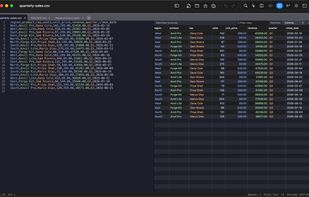
Edit a CSV File with a smart dynamic editor

Cost / License

  • Free
  • Proprietary

Application types

Platforms

  • Mac
1like
1comment
0articles

Features

Properties

  1.  Privacy focused
  2.  Distraction-free
  3.  Lightweight
  4.  Support for Themes

Features

  1.  Syntax Highlighting
  2.  Ad-free
  3.  No registration required
  4. Git icon  Git Support
  5.  No Tracking
  6.  Extensible by Plugins/Extensions
  7.  Dark Mode
  8.  Code Formatting
  9.  Works Offline
  10.  Full-Text Search
  11.  Support for MarkDown
  12.  Comma Separated Values

Incise News & Activities

Highlights All activities

Recent activities

Incise information

  • Developed by

    US flagIvan Histand
  • Licensing

    Proprietary and Free product.
  • Alternatives

    9 alternatives listed
  • Supported Languages

    • English

Our users have written 1 comments and reviews about Incise, and it has gotten 1 likes

Incise was added to AlternativeTo by Ivan Histand on and this page was last updated .

Comments and Reviews

   
Top Positive Comment
M Rushan
0

A great alternative to Notepad++. If you're looking to switch, you won't feel like you're missing anything.

What is Incise?

Incise is a free, native Swift/Cocoa text editor for macOS, built in the spirit of Notepad++ (which has no Mac version). It offers multi-tab editing, Scintilla-powered syntax highlighting, regex find & replace with project-wide search, code folding, multiple cursors, side-by-side diff, a git-aware file tree, an integrated terminal, and Claude Code /ide integration. It also opens CSV, TSV, and JSON as a real, editable table — sort, filter, color cells by inferred type, and edit values written straight back to the file — and converts a file between CSV, JSON, JSON Lines, YAML, TOML, and Markdown tables in one click, entirely on-device. Every tab — even unsaved ones — is restored on relaunch. Available on the Mac App Store and via Homebrew.

Official Links