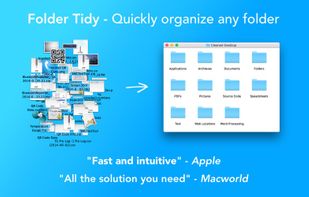
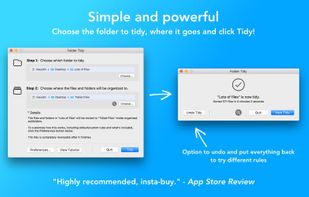
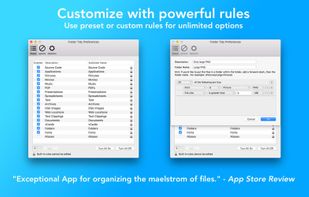
Helps organize disorganized folders by sorting files into subfolders like Pictures, Music, Spreadsheets, or custom groups using pre-set or custom rules, supports undo, exclusions, full CPU usage, and handles vast amounts of files efficiently.


inbetweenbox is described as 'Sits in between your organized file system and the files that you get sent and download everyday. Import these files into inbetweenbox, and inbetweenbox with organize them within it's own library system' and is a File Manager in the file management category. There are more than 10 alternatives to inbetweenbox for a variety of platforms, including Mac, Windows, Linux, Android and F-Droid apps. The best inbetweenbox alternative is Mouzi, which is both free and Open Source. Other great apps like inbetweenbox are FilePipe, Floxtop, Neatify and Hazel.
Helps organize disorganized folders by sorting files into subfolders like Pictures, Music, Spreadsheets, or custom groups using pre-set or custom rules, supports undo, exclusions, full CPU usage, and handles vast amounts of files efficiently.


Ornix automatically organizes your messy Downloads folder. Set it once, and Ornix watches your folders, sorting files into categories like Documents, Images, Videos, and more.


Your Downloads folder is where files go to die. IMG_3427.png, Untitled_document_final_v2.pdf, a hundred things you'll never find again. Waypost fixes that. Waypost reads folders of your choice, then renames, sorts, and tags dropped files based on what's actually inside.


Set up rules, and Rulebook quietly sorts, renames, converts, beeps, moves, copies, archives and tags your files in the background. Like a personal assistant for your folders, so you never have to organize files manually again.


Forget about the mess in your Downloads folder! This extension allows you to set custom download locations with a flexible and strong RegExp-based rules.

Rule-based local file automation. Watch folders, define conditions, and let CaveButler move, archive, or delete files automatically.


Automatically organizes the Android Downloads folder by sorting files into images, videos, documents and apps.


FileSorter is a highly efficient and lightweight Windows tool that can sort and organize all files in multiple folders according to different file attributes such as formats, dates, sizes and names.