


Humata
1 like
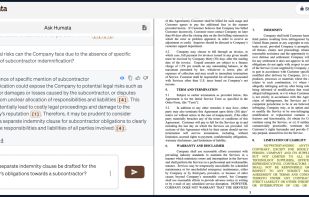
Interact with PDF documents using AI to extract instant summaries, trace answer sources, compare multiple files, collaborate in teams, highlight citations, enable secure sharing, and manage privacy with encryption and role-based controls for enterprise environments.

Cost / License
- Freemium (Subscription)
- Proprietary
Application typeApplication types
Platforms
- Online


Features
Highlights All activities
Humata News & Activities
Recent News
No news, maybe you know any news worth sharing?
Share a News Tip
Recent activities
 lewishadden added Humata as alternative to Sidenote - AI Reading Assistant



Developed by
 Tilda Technologies Inc.
 Licensing
Proprietary and Freemium product.Pricing
Subscription ranging between $2 and $49 per month + free version with limited functionality.Alternatives
17 alternatives listedBadge
Get an embeddable badge for HumataSupported Languages


APPS - BEGIN curated by colin the catalyst
This is a list curated for the purpose of helping to choose the software/ applications (apps) that should be considered at the initial phase i.e. a new or restored device (Mobile Phone, Tablet, Computer/ Laptop, VR/ MR Headset).
The list is based on continuous research, testing and feedback that is intended to help you create an experience that aligns with the goals of your life/ workflow. The research began in 1992 and has included scenario's that consider living conditions guided by the exploration of the three-world model. (The range of countries is currently limited as it requires continued research while factoring in limited time to test, implement and ongoing refinement.)
The list has been curated using a custom time saving processes designed by colin the catalyst that considers a range of life/ work styles.
The sub-categories for this list include the following:
• OPERATING SYSTEM
• INTERNET BROWSER
• APP BROWSER
• FILES
• REMOTE ACCESS
• END
No comments or reviews, maybe you want to be first?