

Hew icon
Hew icon

Hew

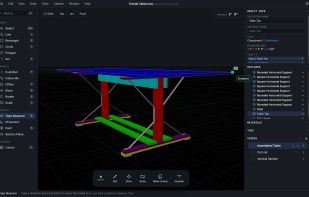
Free, open-source 3D modeler that works like SketchUp: draw on a face, push/pull, snap to what's there. Every shape is a watertight solid. Native on macOS, Windows, Linux, and in the browser. Imports .skp.
Hew screenshot 1

Cost / License

Platforms

  • Online
  • Windows
  • Mac
  • Linux
  • Self-Hosted
2likes
0articles

Features

  1.  Dark Mode
  2.  Works Offline
  3.  Support for scripting
  4.  No registration required
  5.  3D Sculpting
  6.  No Coding Required
  7.  Ad-free
  8.  Support for Layers
  9.  3D Printing
  10.  Cross-Platform
  11.  Web-Based
  12.  Interior Design

Hew News & Activities

Highlights All activities

Recent activities

Hew information

AlternativeTo Categories

Photos & GraphicsSystem & Hardware

GitHub repository

  •  3 Stars
  •  0 Forks
  •  1 Open Issues
  •   Updated  
View on GitHub
Hew was added to AlternativeTo by Kurt Granroth on and this page was last updated .
No comments or reviews, maybe you want to be first?

Official Links

What is Hew?

Hew is a free, open-source 3D modeler for people who learned 3D on SketchUp. It keeps the same way of working: draw on a face, push/pull it into shape, inference snapping to endpoints, midpoints, and axes, typed dimensions mid-gesture, and mostly the same shortcuts. Groups, components, tags, scenes, an Outliner, materials and textures, dimensions, 3D text, Follow Me, Offset, and Section Plane all carry over, typically working exactly like their SketchUp equivalent.

The difference is underneath. Every closed shape you pull becomes its own discrete, watertight solid. Objects never weld together because they touch; combining them is an explicit Union, Subtract, or Intersect. Every object shows its watertight status live, and an operation that would break a solid is refused with an explanation rather than quietly repaired. Models export straight to STL or 3MF for printing.

Hew runs natively on macOS (Apple Silicon and Intel), Windows, and Linux, with automatic updates, and the same full app runs in any modern browser at app.hew3d.com with nothing to install and no account or locally in your homelab via Proxmox, Docker, or plain NGINX. It opens SketchUp .skp files (2017 format, which newer versions can Save As) with groups, components, materials, and tags intact, plus COLLADA, glTF, and STL, and exports glTF, STL, 3MF, and USDZ. Its own file format is a documented zip of JSON and geometry buffers.

Beyond SketchUp: print drawings at exact scale, tiled across pages, with a cut list; scan a QR code to open a model read-only on a phone in the workshop, offline, with AR on iPhone; and a CLI and API for scripting.