

Heavendesk icon
Heavendesk icon

Heavendesk

Low-latency remote desktop for Windows and Linux with GPU encoding, direct peer-to-peer streaming and access even at the login screen.
Home

Cost / License

  • Free
  • Proprietary

Platforms

  • Windows
  • Linux
0likes
0articles
Save

Features

Properties

Features

Highlights All activities

Heavendesk News & Activities

Recent activities

Heavendesk information

Heavendesk was added to AlternativeTo by Mateusz-Ryczko on and this page was last updated .

No comments or reviews, maybe you want to be first?

What is Heavendesk?

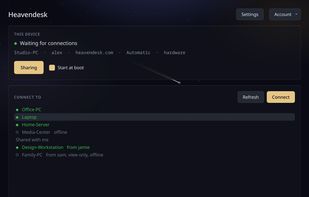
Heavendesk is a remote desktop app for reaching your own computers from anywhere. Sign in on your machine once, and you can connect to it from any other machine with Heavendesk installed.

It is built to feel like you're sitting at the computer, not watching a video of it. The screen is captured and encoded on the GPU, so the machine being shared barely notices the load, and sessions stream at up to 2560×1440 at 60 fps.

Key features:

  • Direct peer-to-peer connections between your machines; a relay is used only when a network blocks direct connections
  • Private by design: Heavendesk pairs your machines but is built so it can never watch your sessions
  • Works at the sign-in screen, so you don't need to be logged in on the remote machine
  • Full Linux support, including both Wayland and X11
  • Multiple monitors, cursor, keyboard shortcuts and sound
  • Firewall-friendly: only needs outgoing connections on port 443, with proxy support

Supported platforms: Windows 10/11 and Linux (Ubuntu, Fedora, Debian, Arch). macOS is not available yet. There is no browser client; both ends use the native app.

Heavendesk is currently in beta and is made in the EU by a small team. Bug reports and feedback are very welcome.