HearthGate is a native macOS security gateway for remote access to a Mac. It manages and hardens the Mac-side OpenSSH access path, while also making Apple Screen Sharing available through secure VNC-over-SSH workflows.
The app runs on the Mac being reached. It helps generate Ed25519 keys, create restricted access profiles, enforce per-key rules, define origin scopes, set expiration dates and time windows, limit sessions, monitor activity, and revoke access when needed. These controls can be used for VNC tunneling, but they are also useful for regular SSH-based remote administration.
For VNC workflows, HearthGate keeps Apple Screen Sharing as the screen server and places access behind SSH tunneling, firewall-enforced VNC lockdown, local-only VNC binding, session visibility, and audit logs. This allows users to connect with their existing SSH and VNC tools without exposing port 5900 directly to the network.
The Connection tab can generate ready-to-use commands, scripts, and connection bundles for different operating systems, including macOS, Linux/Unix, Windows PowerShell, and Windows cmd workflows. Bundles can include launch scripts, connection files, keys, and helper materials so remote access can be prepared without manually writing every SSH command.
HearthGate is designed for Mac admins, homelab users, consultants, studios, developers, and security-conscious individuals who want controlled SSH and VNC-over-SSH access without depending on a proprietary cloud relay or account-based viewer ecosystem. It works alongside existing SSH/VNC tools such as OpenSSH, PuTTY, MobaXterm, RealVNC, TigerVNC, TightVNC, Remmina, AVNC, and Screens.
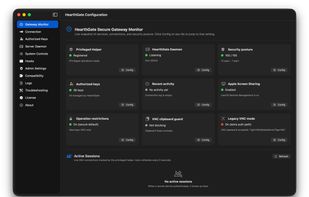
Security and operations features include restricted keys, VNC-only keys, optional broader SSH keys, per-key origin scopes, expiration dates, time windows, session caps, brute-force IP blocking, one-click disconnect, key revocation, clipboard guard, connection hooks, encrypted exports/backups, System Controls, process visibility, live unified logs, and audit/event history.
HearthGate is not a standalone VNC viewer and it does not replace Apple Screen Sharing or OpenSSH. It secures, manages, and packages the Mac-side SSH and VNC-over-SSH workflow while letting users connect with the SSH client or VNC viewer they already use.







 codnamacs added HearthGate as alternative to vshell and OpenSSH
 codnamacs

No comments or reviews, maybe you want to be first?