
Hawky icon
Hawky icon

Hawky

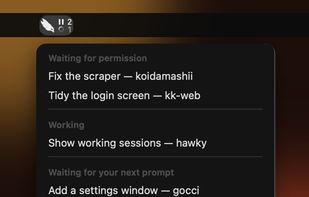
A macOS menu bar app that tells you when Claude Code is waiting for permission, and takes you to that window.
Hawky screenshot 1

Cost / License

  • Free
  • Open Source (MIT)

Platforms

  • Mac
0likes
0articles
Save

Features

Hawky News & Activities

Highlights All activities

Recent activities

Hawky information

AlternativeTo Category

AI Tools & Services

GitHub repository

  •  0 Stars
  •  0 Forks
  •  7 Open Issues
  •   Updated  
View on GitHub
Hawky was added to AlternativeTo by piro0919 on and this page was last updated .

No comments or reviews, maybe you want to be first?

Official Links

What is Hawky?

Hawky keeps watch over Claude Code from the macOS menu bar.

Run Claude Code in several repositories at once, one Cursor or VS Code window each, and sooner or later one of them stops to ask whether it may run something. It then waits silently while you are looking at another window.

When a session is waiting for permission, a count appears next to the hawk in the menu bar. Each waiting session is a row in the menu, named after the session's title and its folder. Pick one and Hawky brings that window, and that tab, to the front — also when the window is tucked behind others as a macOS tab. Ctrl+Option+H jumps to the session that has waited longest.

Hawky also shows how many sessions are working, and lists the ones that have finished and are waiting for your next prompt. A wait clears itself as soon as you approve, deny or type a new prompt.

It works with Claude Code in Cursor and VS Code, through Claude Code's own hooks. The hooks call Hawky itself, so nothing else needs to be installed. Connecting backs up your settings.json first and leaves your other hooks as they are.

Free and open source under the MIT license. macOS 14 or later.
